


Apparently my profile was synched with another account?

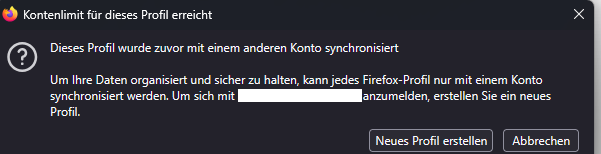
I wanted to synch my current settings in my browser to import them on my new laptop. When I tried to login to my account, I the message from the attached screenshot appeared. So I created a new profile, got my stuff back to what it should be and then deleted the "new" profile. But now every time I try to get into the correct profile and login into my account, I still get the message from the screenshot. I never ever synched with another profile before and never had an issue in the past. Right now I am rather pissed off, because I lost atleast some of my bookmarks during this whole ordeal.
Geändert am von hf_alexander
Ausgewählte Lösung
It turned out, for the sync the e-mail is case sensitive. If one is not sure which way it's saved in the account (though I have no idea if it ever get's saved with uppercase letters), one can login on the website and take a look into the profile and try it the way it's saved there, since there is no case sensitivity on the website.
Edit: the e-mail for the sync is not expected to be case sensitive and the support team is looking into that.
Geändert am von hf_alexander
Alle Antworten (5)
Edit: So annoyed right now, that I am to stupid to use this help section the way it is intended....
Geändert am von hf_alexander
Hi,
Looks like you're dealing with a Mozilla account issue. We have a direct one-to-one support for Mozilla account (which is a different thing from peer to peer support forum like this one).
Please submit a new ticket from this page so our support agent can assist you further.
No problem, happy to help.
Ausgewählte Lösung
It turned out, for the sync the e-mail is case sensitive. If one is not sure which way it's saved in the account (though I have no idea if it ever get's saved with uppercase letters), one can login on the website and take a look into the profile and try it the way it's saved there, since there is no case sensitivity on the website.
Edit: the e-mail for the sync is not expected to be case sensitive and the support team is looking into that.
Geändert am von hf_alexander