


how to view bookmarks sort by folder location

how to view bookmarks sort by folder location
thanks
Alle Antworten (10)
Hi,
Head to menu -> Bookmarks -> Manage bookmarks.
Nope. That's not correct. That only lists them by name, but not by folder.
Hi,
To sort bookmarks by folder location in the Firefox Bookmarks Library, open the Library window (Ctrl+Shift+O), select the desired folder in the left pane, and then use the "Views" menu to select Sort > Sort by Location.
Exactly how does that apply to the Search results display?
I don't understand what you mean? Im sorry
kitchm1 said
Nope. That's not correct. That only lists them by name, but not by folder.
I guess it's correct though
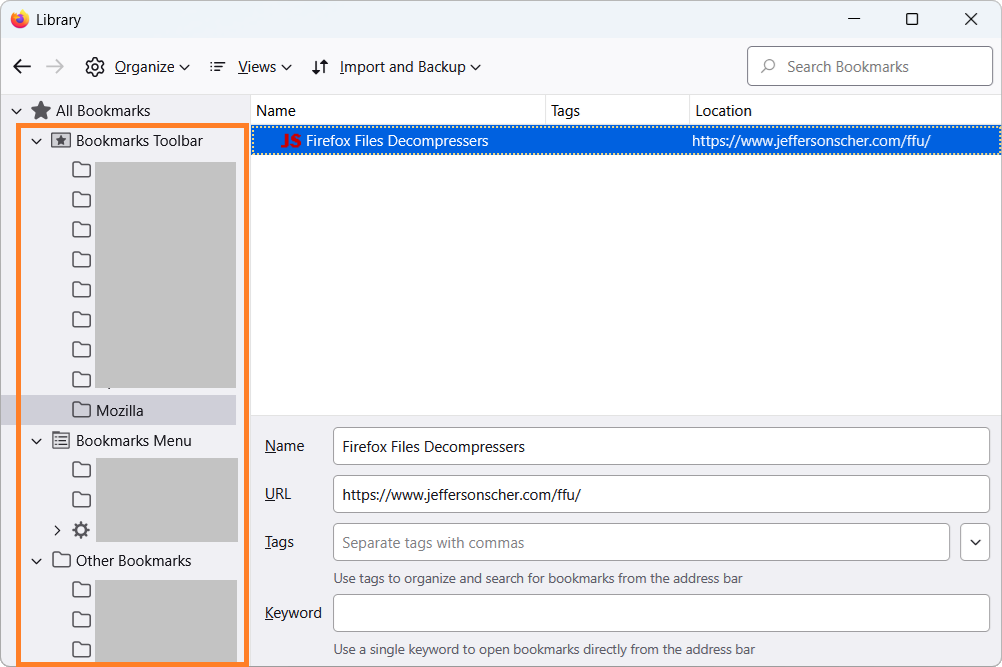
Nope, no one seems to get it. So, go to the Bookmarks Manager view. On the left, select 'All Bookmarks'. Go to the top right and put in word to search for. The results appear on the right underneath that.
Now here is where it gets interesting. Right-click on the 'Name' bar. Notice that there is no choice to display the folder in which the results come from.
I want to be able to sort by containing folder location.
Maybe this will help
https://support.mozilla.org/en-US/kb/sort-bookmarks-quickly-find-ones-you-want
kitchm1 said
Nope, no one seems to get it. So, go to the Bookmarks Manager view. On the left, select 'All Bookmarks'. Go to the top right and put in word to search for. The results appear on the right underneath that. Now here is where it gets interesting. Right-click on the 'Name' bar. Notice that there is no choice to display the folder in which the results come from. I want to be able to sort by containing folder location.
Oh, I see it now. That's a known issue tracked under bug 469421. Currently you can only right-click individual results and use Show in Folder.
Another option is to add an extension that provides such functionality. You can look for it on addons.mozilla.org.
Ah, I see. I did not know there was a bug/feature request already. But it does make perfect sense. Too bad this obvious need is 17+ years old. Absolutely bizarre.
Making it worse is that once an item is selected, the search results are wiped out and the directory is changed to another location. The user must then start all over again.
I wonder why there aren't programming language libraries that already have this functionality? Odd.