


Windows 10 will reach EOS (end of support) on October 14, 2025. For more information, see this article.

Hilfe durchsuchen

Vorsicht vor Support-Betrug: Wir fordern Sie niemals auf, eine Telefonnummer anzurufen, eine SMS an eine Telefonnummer zu senden oder persönliche Daten preiszugeben. Bitte melden Sie verdächtige Aktivitäten über die Funktion „Missbrauch melden“.

Weitere Informationen

Virus? ATTENTION! Click here to secure your data

  • 2 Antworten
  • 0 haben dieses Problem
  • 27 Aufrufe
  • Letzte Antwort von James

more options

I tried to open to a site WWW.RAFY-A.com this morning and got an alert it was not available, but, I am now unable to dismiss or close the following ATTENTION! messages. I did click on the "click here to secure your data! on the top two now it shows a yellow triangle which I'm still unable to close or dismiss. Could someone please explain how to get rid of these. I ran Dell Support Assist but I do not have a virus option. I have not rebooted yet as I wanted to clear this up first and then reboot. Thank you. Irene
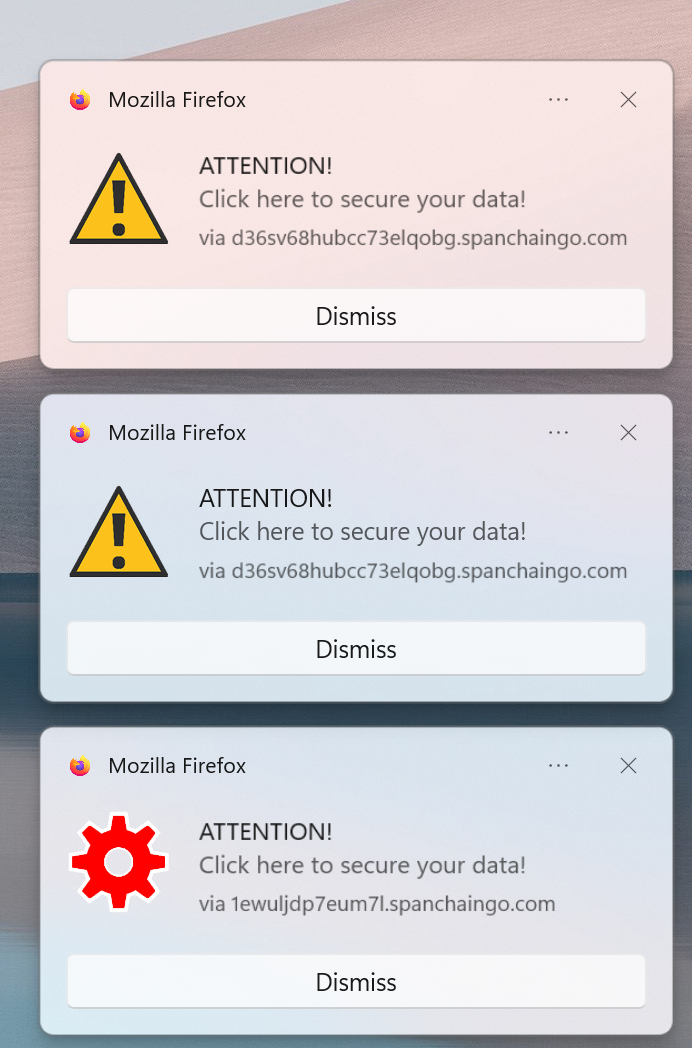
I tried to open to a site WWW.RAFY-A.com this morning and got an alert it was not available, but, I am now unable to dismiss or close the following ATTENTION! messages. I did click on the "click here to secure your data! on the top two now it shows a yellow triangle which I'm still unable to close or dismiss. Could someone please explain how to get rid of these. I ran Dell Support Assist but I do not have a virus option. I have not rebooted yet as I wanted to clear this up first and then reboot. Thank you. Irene
Angefügte Screenshots

Ausgewählte Lösung

If these are small popups on the bottom right corner of Firefox windows then these may just be web push notifications from sites you have allowed to send you notifications. Instead of useful information, some may send you junk, spam, fake virus/trojan alerts etc. You can revoke the sites from sending you notifications as shown in second link below.

https://support.mozilla.org/en-US/kb/push-notifications-firefox https://support.mozilla.org/en-US/kb/push-notifications-firefox#w_how-do-i-revoke-web-push-permissions-for-a-specific-site

Diese Antwort im Kontext lesen 👍 0

Alle Antworten (2)

more options

Seems like Phishing. Nobody should go to that site, or click anything on it.

more options

Ausgewählte Lösung

If these are small popups on the bottom right corner of Firefox windows then these may just be web push notifications from sites you have allowed to send you notifications. Instead of useful information, some may send you junk, spam, fake virus/trojan alerts etc. You can revoke the sites from sending you notifications as shown in second link below.

https://support.mozilla.org/en-US/kb/push-notifications-firefox https://support.mozilla.org/en-US/kb/push-notifications-firefox#w_how-do-i-revoke-web-push-permissions-for-a-specific-site

Stellen Sie eine Frage

Sie müssen sich mit Ihrem Benutzerkonto anmelden, um auf Beiträge zu antworten. Bitte stellen Sie eine neue Frage, wenn Sie noch kein Benutzerkonto haben.