


Session corruption?

I have a profile that causes odd behavior, within the profile, and to the OS.
Regarding the profile itself:
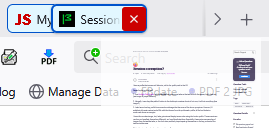
1. I use Multiple Tab Handler, which should allow me to move tabs on the tab bar with the mouse, but it does not (see image of proper behavior)
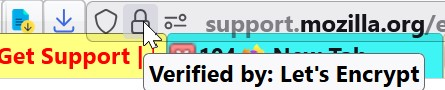
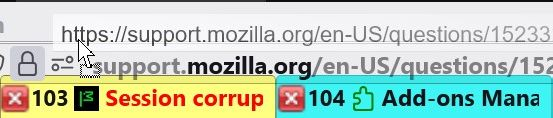
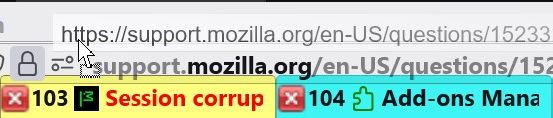
2. Normally, i can drag this padlock button to the desktop to create a shortcut. but now, it will not move/drag (see image 2)
3. I also have a backup profile from several months ago that has none of the above symptoms. However, If I substitute it's sessionstore.jsonlz4 file with the the one from the problematic profile, all the bad behavior mentioned above re-emerges.
I know this sounds strange, but, I also get external display issues when using the broken profile. These events are random, and manifest themselves differently, so I can't duplicate them. Essentially, these snips are examples of images from the taskbar tabs, or the clock area, suddenly superimposing themselves on the top portions of the taskbar toolbar area.
This is the view of my clock area (see next image 3)
In the following image, imagine that the portion on the left, that opens the start menu, is now hidden under what looks exactly like the clock area on the right, superimposed over it (see next image 4)
Those aberrations are removed by simply moving the mouse cursor over them, but they will continue to occur in any number of variations over any area of that top toolbar.
Is there a Session Manager that will save the session, to be later restored into that previous profile, but not also pass along the corruption?



Geändert am von noel_envode
Alle Antworten (20)
noel_envode said
I have a profile that causes odd behavior, within the profile, and to the OS. Regarding the profile itself: 1. I use Multiple Tab Handler, which should allow me to move tabs on the tab bar with the mouse, but it does not (see image of proper behavior)
Firefox already lets you move tabs with the mouse. I'm not sure why you need an add-on for that. Could you explain this in a little more detail? Does it work if you disable the extension?
2. Normally, i can drag this padlock button to the desktop to create a shortcut. but now, it will not move/drag (see image 2)
Is this a problem with dragging it anywhere, or can you still drag-and-drop to the Bookmarks Toolbar to create a new bookmark? There does seem to be some overlap between the toolbars in the image (I assume everything is modified with userChrome.css rules).
3. I also have a backup profile from several months ago that has none of the above symptoms. However, If I substitute it's sessionstore.jsonlz4 file with the the one from the problematic profile, all the bad behavior mentioned above re-emerges.
Does this problem affect all open windows in the current session, or only one window? If it's only one window, perhaps there is something unusual about one of the tab titles?
I know this sounds strange, but, I also get external display issues when using the broken profile. These events are random, and manifest themselves differently, so I can't duplicate them. Essentially, these snips are examples of images from the taskbar tabs, or the clock area, suddenly superimposing themselves on the top portions of the taskbar toolbar area. This is the view of my clock area (see next image 3) In the following image, imagine that the portion on the left, that opens the start menu, is now hidden under what looks exactly like the clock area on the right, superimposed over it (see next image 4) Those aberrations are removed by simply moving the mouse cursor over them, but they will continue to occur in any number of variations over any area of that top toolbar. Is there a Session Manager that will save the session, to be later restored into that previous profile, but not also pass along the corruption?
They appear superimposed on Firefox, or on other parts of the Windows Taskbar?
I don't know what kind of ransom note that is on your taskbar; could be time to involve the authorities.
jscher2000 - Support Volunteer said
Firefox already lets you move tabs with the mouse. I'm not sure why you need an add-on for that. Could you explain this in a little more detail? Does it work if you disable the extension?
I just removed the extension from the problem profile. Symptoms remain. As I said, the backup profile works fine, with Multiple Tab Handler installed. But when i replaced it's sessionstore.jsonlz4 file with the one from the bad profile, the same movement symptoms occurred. I didn't use it long enough to see about to see about those taskbar image stuff.
jscher2000 - Support Volunteer said
Is this a problem with dragging it anywhere, or can you still drag-and-drop to the Bookmarks Toolbar to create a new bookmark? There does seem to be some overlap between the toolbars in the image (I assume everything is modified with userChrome.css rules)Maybe I'm wrong, but I think the fact all I have to do is move the sessionstore.jsonlz4 to the good profile for it to cause the same behavior says a lot.
CSS,, yes. There is no drag-and-drop. Normally, you see what you are dragging. There is no movement, just like with a tab. This never begins (see image)
jscher2000 - Support Volunteer said
Does this problem affect all open windows in the current session, or only one window? If it's only one window, perhaps there is something unusual about one of the tab titles?I dont know what you're referring to. The only areas affected are within the profile, and the desktop taskbar
jscher2000 - Support Volunteer said
They appear superimposed on Firefox, or on other parts of the Windows Taskbar?Visualize that clock example, without the action button, appearing identical on both sides of the taskbar
Any opinion bout a Session Manager solution?
jscher2000 - Support Volunteer said
I don't know what kind of ransom note that is on your taskbar; could be time to involve the authorities.ransom note??? Is that your signature?
Geändert am von noel_envode
Oh wait, I have a thought. Is this the issue:
In your first screenshot, between tabs 105 and 106, there is a purple square indicating the start of a tab group:
Tab 106 is in a group. Your CSS causes the tab to obscure the group underline that indicates which tabs are in that group. For general reference about tab groups, see: Tab groups in Firefox.
When you are moving tab 105 over tab 104, depending on the degree of overlap, Firefox will detect this as an attempt to group them. Normally this causes a box to appear around the group --
-- but possibly your CSS overrides that. If you release the mouse at this point, the tabs do not switch positions, they are grouped. If it's a new group, you get a panel asking you to choose properties for the group.
But if you keep moving tab 105 all the way to the left boundary of tab 104, Firefox will understand that you are not trying to group them and you can drop as normal.
And how does this affect the sessionstore.jsonlz4 file? Session history includes the tab group information.
Are we getting closer?
Comments from before that thought:
By "window" I meant a Firefox window, the kind you create with Ctrl+N. If the problem only occurs in one window, there may be something weird about one of the tabs in that window. To test, try this:
Multi-select a bunch of tabs in your main window. You can click one tab to start the range, then shift+click the last tab in the range to multi-select them. Then right-click any selected tab > Move Tabs > Move to New Window. Does the problem of not being able to move tabs occur in both windows or only the original window?
My joke about the ransom note was in reference to your Windows Taskbar: this looked like one of those classic ransom notes with letters cut out of different parts of a newspaper/magazine:
jscher2000 - Support Volunteer said
Oh wait, I have a thought. Is this the issue:About that image you referenced, you asked for more info/description. My intention was to demonstrate, from the good profile, what a tab move was supposed look like.
When I try to do the same with the bad profile, nothing happens. When I say "nothing happens", is that when I left click on that padlock, and hold it with the left mouse button, then, move the cursor, the mouse doesn't capture the object/padlock, which is what you would expect to see here (see image).
In the case of the bad profile, from the beginning of that exercise, nothing happens.
One more thing. I have another profile, with far more tabs that the bad one, that has the same addons as the bad one, plus a bunch more, and none those display idiosyncrasies, as well as the other problems described, occur when using that one, as well as the backup.
BTW, I have never used tab groups, so I have no explanation for that. But, it's within the good profile, and it's about:addons
Geändert am von noel_envode
Tab grouping is now a built-in feature. See: Tab groups in Firefox.
Try the second experiment:
jscher2000 - Support Volunteer said
By "window" I meant a Firefox window, the kind you create with Ctrl+N. If the problem only occurs in one window, there may be something weird about one of the tabs in that window. To test, try this: Multi-select a bunch of tabs in your main window. You can click one tab to start the range, then shift+click the last tab in the range to multi-select them. Then right-click any selected tab > Move Tabs > Move to New Window. Does the problem of not being able to move tabs occur in both windows or only the original window?
jscher2000 - Support Volunteer said
Tab grouping is now a built-in feature. See: Tab groups in Firefox.Yes, I'm aware. Actually, that's a subject I 'd iike to discuss later.
jscher2000 - Support Volunteer said
By "window" I meant a Firefox windowNo ability to move tabs in either window.
I have some examples of those odd display effects, taken today.
First, the ransom note normal view
Next, this one is particularly unusual. Not only is the "Mozilla Firefox" tab artificially imposed over the top toolbar, but it should still be on the bottom toolbar. Once it is touched by the cursor (no click necessary), it goes away
Third, we have one toolbar button obscured by a black square
Finally, we have that clock phenomena I discussed, over the start menu and search buttons.
One other thing I just discovered. After an unspecified amount of time, usually not very long, the mouse hover stops working on all toolbar butons.



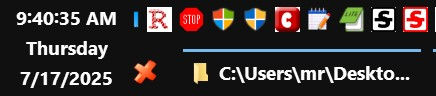
Geändert am von noel_envode
If you create a new window with 3 blank tabs (Ctrl+N, Ctrl+T, Ctrl+T), can you move those tabs around the tab bar?
If you need to archive your session, you can try using my Scrounger tool to extract the list of open tabs to a list of links. Either:
- https://www.jeffersonscher.com/ffu/scrounger.html
- https://jscher2000.github.io/Firefox-File-Utilities/scrounger.html
Regarding the four screenshots: I have no idea what is going on there. It's basically unrecognizable to me.
jscher2000 - Support Volunteer said
If you create a new window with 3 blank tabs (Ctrl+N, Ctrl+T, Ctrl+T), can you move those tabs around the tab bar?I did the keyboard combo thing. No movement. Also, here's a sample of the broken mouse hover
jscher2000 - Support Volunteer said
If you need to archive your session, you can try using my Scrounger tool to extract the list of open tabs to a list of links. Either:Is there a way to restore the tabs? In their current order?
jscher2000 - Support Volunteer said
Regarding the four screenshots: I have no idea what is going on there. It's basically unrecognizable to me.I only included that was because it is a direct result of using this bad profile. No other profile, or activity, causes any of these symptoms.
Please tell me if I'm wrong. If I replace only the bad sessionstore.jsonlz4 with the good sessionstore.jsonlz4 from the backup profile, all the mess, everything, goes back to normal. Is there no way to inspect that bad sessionstore.jsonlz4 file for irregularities?
Do you still think it may be a single tab as the origin? Maybe I should wipe out a whole block of tabs, a section at a time, to test?
I have never used sync. I have asked questions before about controlling how and what is synced, but never got an answer. None of my profiles are signed in for that.
My confusion is, does the syncing only goes in one direction, or are the synced sessions combined? Hypothetically, could I take another profile, wipe out the session, then sync sessions with the bad one, so now the new one emulates the old, without passing along the bad stuff? I can manually transfer the history, bookmarks, cookies, etc.

Geändert am von noel_envode
jscher2000 - Support Volunteer said
If you create a new window with 3 blank tabs (Ctrl+N, Ctrl+T, Ctrl+T), can you move those tabs around the tab bar?I did the keyboard combo thing. No movement. Also, here's a sample of the broken mouse hover
jscher2000 - Support Volunteer said
If you need to archive your session, you can try using my Scrounger tool to extract the list of open tabs to a list of links. Either:Is there a way to restore the tabs? In their current order?
jscher2000 - Support Volunteer said
Regarding the four screenshots: I have no idea what is going on there. It's basically unrecognizable to me.I only included that was because it is a direct result of using this bad profile. No other profile, or activity, causes any of these symptoms.
Please tell me if I'm wrong. If I replace only the bad sessionstore.jsonlz4 with the good sessionstore.jsonlz4 from the backup profile, all the mess, everything, goes back to normal. Is there no way to inspect that bad sessionstore.jsonlz4 file for irregularities?
Do you still think it may be a single tab as the origin? Maybe I should wipe out a whole block of tabs, a section at a time, to test?
I have never used sync. I have asked questions before about controlling how and what is synced, but never got an answer. None of my profiles are signed in for that.
My confusion is, does the syncing only goes in one direction, or are the synced sessions combined? Hypothetically, could I take another profile, wipe out the session, then sync sessions with the bad one, so now the new one emulates the old, without passing along the bad stuff? I can manually transfer the history, bookmarks, cookies, etc.
noel_envode said
jscher2000 - Support Volunteer said
If you need to archive your session, you can try using my Scrounger tool to extract the list of open tabs to a list of links. Either:Is there a way to restore the tabs? In their current order?
You mean automatically, without manually clicking links? But also without using one of the session history files that has the problem? I suppose there might be some "open all selected links" extension you could use on the HTML archive page created by the Scrounger. Otherwise, no, it would be manual.
Please tell me if I'm wrong. If I replace only the bad sessionstore.jsonlz4 with the good sessionstore.jsonlz4 from the backup profile, all the mess, everything, goes back to normal. Is there no way to inspect that bad sessionstore.jsonlz4 file for irregularities?
You can decompress the file, but we don't know what we're looking for.
Do you still think it may be a single tab as the origin? Maybe I should wipe out a whole block of tabs, a section at a time, to test?
I thought maybe a single tab could be causing the problem in one window, but since you haven't been able to create a new window that allows moving tabs, I don't know what is causing the problem.
I have never used sync. I have asked questions before about controlling how and what is synced, but never got an answer. None of my profiles are signed in for that.
Okay, please don't start right now.
My confusion is, does the syncing only goes in one direction, or are the synced sessions combined? Hypothetically, could I take another profile, wipe out the session, then sync sessions with the bad one, so now the new one emulates the old, without passing along the bad stuff? I can manually transfer the history, bookmarks, cookies, etc.
Open tabs are handled differently than bookmarks and history. When it comes to open tabs, only the title and URL of the current page are synced, and they are displayed in a Synced Tabs sidebar separately by Firefox installation/profile. If you were to use Sync right now, the tabs would not open automatically on the second Firefox installation/profile, but you could open them from the sidebar. How do I choose what information to sync on Firefox?
Could you try using the problem session history file in a clean profile:
Inside Firefox, type or paste about:profiles in the address bar and press Enter/Return to load it.
Take a quick glance at the page and make a mental note of which Profile has this notation: This is the profile in use and it cannot be deleted. That is your current default profile.
Click the "Create a New Profile" button, then click Next. Assign a name like Test2025, ignore the option to relocate the profile folder, and click the Finish button.
Firefox will switch your default profile to the new one, so click the Set as Default Profile button for your regular one to avoid an unwanted surprise at your next startup.
Scroll down to Test2025 and click the Open Folder button on the Root Directory line. This should launch a Windows File Explorer window showing the new profile. Drop in a copy of sessionstore.jsonlz4.
Back on about:profiles, click the Launch profile in new browser button for Test2025.
Firefox should open a new window that looks like a brand new, uncustomized installation. (Your existing Firefox window(s) should not be affected.) Please ignore any tabs enticing you to connect to a Sync account or to activate extensions found on your system to get a clean test.
Restore the session history file using either:
- "3-bar" menu button > History > Restore Previous Session
- (menu bar) History > Restore Previous Session
Does the tab moving problem occur in the clean profile, either immediately or after a little bit of use?
When you are done with the experiment, you can close the extra window without affecting your regular Firefox profile. (Test2025 will remain available for future testing.)
jscher2000 - Support Volunteer said
Could you try using the problem session history file in a clean profile
I use the Firefox Profile Manager. I also have a fresh profile. No tweaks. I substituted it's sessionstore.jsonlz4 with the one from the bad profile. Went to history, restore, settings > startup >open previous windows and tabs.
Guess what? I can move the tabs, and the padlock. Haven't used it long enough to see if the display weirdness shows up, but if the tabs are ok, I'm cautiously optimistic.
Do you foresee any problems with my approach?
Geändert am von noel_envode
I'm not sure what you are referring to here:
> Do you foresee any problems with my approach?
It sounds like the test was successful, indicating that there is some incompatibility between the open tabs and the customizations in the regular profile. But I don't know of an efficient way to assess which customizations might need updating.
jscher2000 - Support Volunteer said
I'm not sure what you are referring to here: > Do you foresee any problems with my approach? It sounds like the test was successful, indicating that there is some incompatibility between the open tabs and the customizations in the regular profile. But I don't know of an efficient way to assess which customizations might need updating.
Because i don't trust that file.
I can cite several reasons, but the main one I'm focused on now is all about this alleged incompatible relationship with the customizations, which, ostensibly, given the fresh profile experience, might seem valid.
However, tho It would not be the first time I have been wrong, how do we explain the fact that when, in the bad profile, after I ran the about:support troubleshooter, in safe mode, all the bad stuff previously described, still remained. Every symptom (I didn't use the profile long enough to verify those display issues, but everything else).
I've had to deal with corrupted sessions several time over years. I've seen the problems progress. Starts with one thing, then, little by little, a series of other maladies get added to the mix. until the profile, for all intents and purposes, becomes unusable.
If one exists, I need a tab manager that can do the simple job of backing up and restoring just the tabs alone, preferably in the same order.
Mozilla recommends Tab Session Manager. I had a bad experience with it years in the distant past. I just tried it again. It wrecked that fresh profile. I had it set to open the previous session on startup, after which, among other things, none of the tabs were accessible. Very similar to what occurred years ago.
Geändert am von noel_envode
noel_envode said
However, tho It would not be the first time I have been wrong, how do we explain the fact that when, in the bad profile, after I ran the about:support troubleshooter, in safe mode, all the bad stuff previously described, still remained. Every symptom (I didn't use the profile long enough to verify those display issues, but everything else).
Oh, sorry, I missed that detail. Perhaps, then, it is a settings difference. If you go into about:config in the two different profiles and filter using browser.tabs and compare the two, can you spot anything different between them?
jscher2000 - Support Volunteer said
Are you talking about the bad profile and the fresh profile (not the backup profile) I've been using to swap files. There are no settings changes in the fresh, except "open previous session". The backup is essentially a clone of the bad one, but since it's session file works properly in the bad, apparently backed up before the corruption took place in the bad one. Identical about:config.noel_envode said
However, tho It would not be the first time I have been wrong, how do we explain the fact that when, in the bad profile, after I ran the about:support troubleshooter, in safe mode, all the bad stuff previously described, still remained. Every symptom (I didn't use the profile long enough to verify those display issues, but everything else).Oh, sorry, I missed that detail. Perhaps, then, it is a settings difference. If you go into about:config in the two different profiles and filter using browser.tabs and compare the two, can you spot anything different between them?
I can only conclude that sessionstore.jsonlz4 is corrupted. Something about it is conflicting with the same settings that do not create problems with the sessions in any other profiles.
That's why the bad works ok in the fresh profile. No altered settings.
The only thing that will help me now is a tab manager that can simply back up and restore a session, and see if it does or does not bring back the corruption when it restores. A tab manager that makes it's own backup, a copy of the tabs, not a copy of the sessionstore.jsonlz4.
Geändert am von noel_envode
Tab Session Manager can save open tabs as a session and restore them: https://addons.mozilla.org/firefox/addon/tab-session-manager/
Note: I don't use it myself.
jscher2000 - Support Volunteer said
Tab Session Manager can save open tabs as a session and restore them: https://addons.mozilla.org/firefox/addon/tab-session-manager/ Note: I don't use it myself.Did you see my mention of it in previous post today?
Geändert am von noel_envode
You can look at Session Sync. However, it works differently: it saves tabs in your bookmarks.
jscher2000 - Support Volunteer said
You can look at Session Sync. However, it works differently: it saves tabs in your bookmarks. https://addons.mozilla.org/firefox/addon/session-sync/Can it restore the bookmarks as tabs
The description on that page says it can. I have not tested it myself.