


Website won't open using Firefox; it may be due to NoScript Add-on but not able to set NoScript to less secure setting

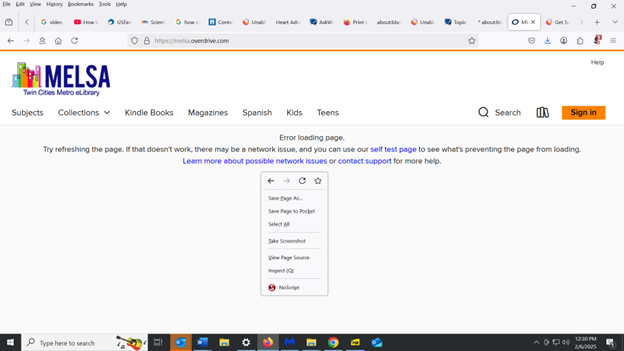
I'm not able to reach a webpage melsa.overdrive.com using Firefox, but I can reach it OK using Chrome. I get a message that says "Error loading page". This may be due to my NoScript add-on, but usually I can overcome that sort of problem by right-clicking on the page and then setting NoScript to a less secure setting. However, in this case, when I right-clicked on the page and then tried to left-click on NoScript in the drop-down menu, nothing happened (see attached screenshot). So the only way I can overcome the problem in this case is to disable NoScript entirely. Why am I not able to access NoScript to set it to a less secure setting, rather than disable it entirely? And is there a way to overcome that?
Alle Antworten (1)
I normally use the NoScript toolbar button directly rather than though the right-click context menu, so I'm not sure of what might be going wrong in the coordination. Are you able to make a site exception using the toolbar button? If not, I suggest reloading the page (Ctrl+R) and waiting until loading completes in case NoScript can't operate properly while it's loading.