


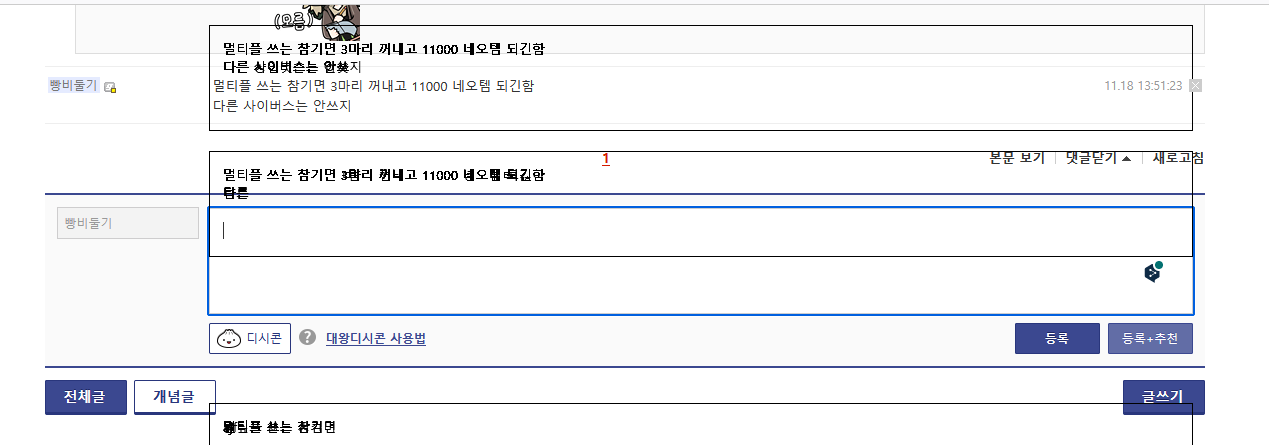
Text boxes duplicating in certain websites

Using text boxes such as comment sections in certain sites will "duplicate" the boxes directly over it Scrolling up and down will lock the boxes on screen and leave multiple traces of the text boxes Refreshing the page will remove the boxes temporarily but will happen again Happens inconsistently on multiple websites Site shown under is dcinside.com
Alle Antworten (2)
You may have accidentally zoomed webpage(s). Reset the page zoom on pages that cause problems.
- View -> Zoom -> Reset (Ctrl+0/Command+0 (zero))
If you have made changes to Advanced font-size settings like increasing the minimum/default font-size, try the Default font-size setting "16" and the Minimum font-size setting "none" to see if that makes a difference.
- Settings -> General -> Language and Appearance -> Fonts -> Advanced -> Minimum Font Size (none)
Make sure you allow pages to choose their own fonts as this affects iconic fonts.
- Settings -> General -> Language and Appearance -> Fonts -> Advanced
[X] "Allow pages to choose their own fonts, instead of your selections above"
It is better not to increase the minimum font-size, but to use the built-in Firefox Zoom feature.
- Settings -> General -> Language and Appearance -> Zoom
See also:
Does it still happen in Troubleshoot Mode?