


Windows 10 reached EOS (end of support) on October 14, 2025. If you are on Windows 10, see this article.

Hilfe durchsuchen

Vorsicht vor Support-Betrug: Wir fordern Sie niemals auf, eine Telefonnummer anzurufen, eine SMS an eine Telefonnummer zu senden oder persönliche Daten preiszugeben. Bitte melden Sie verdächtige Aktivitäten über die Funktion „Missbrauch melden“.

Weitere Informationen

can not receive mails on two accounts

  • 1 Antwort
  • 0 haben dieses Problem
  • 36 Aufrufe
  • Letzte Antwort von sfhowes

accounts: contact@residence-edouard.com and anusara@prince-edouard.com can not receive mails, can send mails those accounts are working good on another computer I already set up the security.tls.version min to 1 (this was needed after updating the Thunderbird - two accounts on 4 are working good again: fa430211@skynet.be and smas.postyns@selexion.net) I also set up the server setting to IMAP.prince-edouard.com (instead of pop3.prince-edouard.com).

Still can not receive mails on those two accounts. The server is on our website www.prince-edouard.com, where we have different mail addresses I can see the mails on the server.

There is, for those two accounts, a padlock on the icon which is left of the account name under Folders on the main window of Thunderbird. see screen shot attached.

Thanks for your help. John
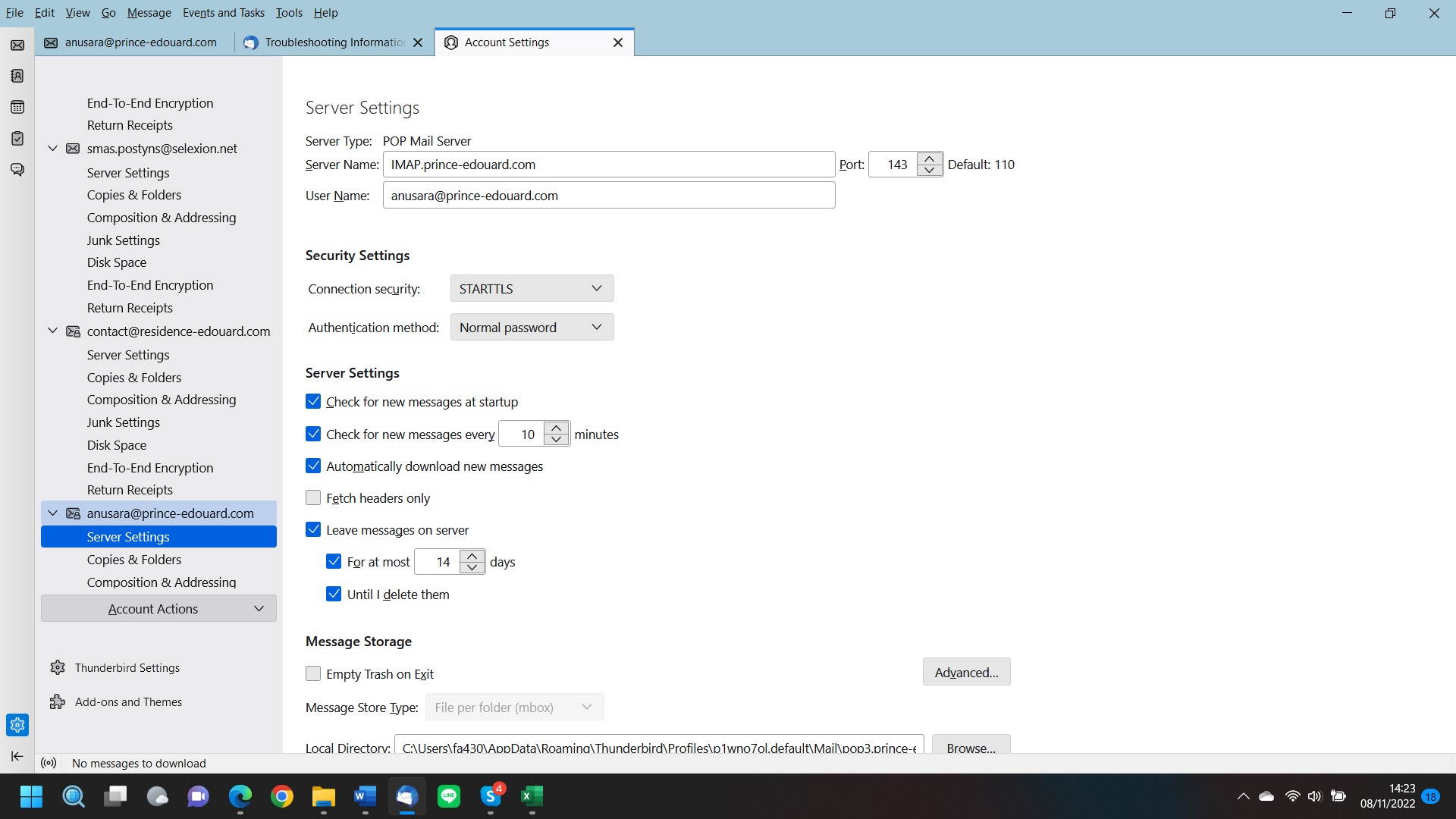
accounts: contact@residence-edouard.com and anusara@prince-edouard.com can not receive mails, can send mails those accounts are working good on another computer I already set up the security.tls.version min to 1 (this was needed after updating the Thunderbird - two accounts on 4 are working good again: fa430211@skynet.be and smas.postyns@selexion.net) I also set up the server setting to IMAP.prince-edouard.com (instead of pop3.prince-edouard.com). Still can not receive mails on those two accounts. The server is on our website www.prince-edouard.com, where we have different mail addresses I can see the mails on the server. There is, for those two accounts, a padlock on the icon which is left of the account name under Folders on the main window of Thunderbird. see screen shot attached. Thanks for your help. John
Angefügte Screenshots

Alle Antworten (1)

Your picture shows the account is POP Server Type, but you've entered IMAP settings. It's not possible to change from POP to IMAP just by changing the settings - you have to remove the POP account and then add it as an existing IMAP account.

https://support.mozilla.org/en-US/kb/switch-pop-imap-account

Copy the POP mail to Local Folders, remove the POP account, restart TB, add it as IMAP.