

Dieses Thema wurde archiviert.
Bitte stellen Sie eine neue Frage, wenn Sie Hilfe benötigen.

Gelöst
Archiviert
TB 91.3.0 - Calendar - Change selected day colour
Hi.
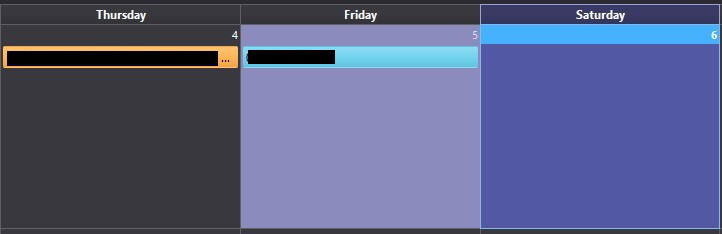
I want to change the colour of the selected day in the TB Calendar. On my screenshot:
Thursday: unselected day Friday: Selected day (colour I want to change to the same colour as the day background (dark grey)) Saturday: Today
Anyone knows how to do this please? Thank you
Hi.
I want to change the colour of the selected day in the TB Calendar.
On my screenshot:
Thursday: unselected day
Friday: Selected day (colour I want to change to the same colour as the day background (dark grey))
Saturday: Today
Anyone knows how to do this please?
Thank you
Alle Antworten (2)
Ausgewählte Lösung
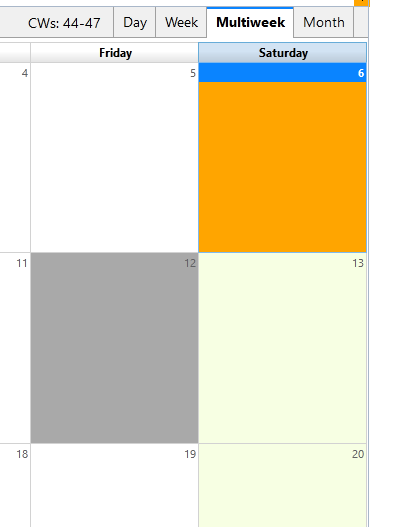
Here is a userChrome.css:
.calendar-month-day-box-current-month[selected="true"] {
  background-color: darkgrey !important;
}

.calendar-month-day-box-current-month[relation="today"] {
  background-color: orange !important;
}
Help/More Troubleshooting, Profile Folder, Open Folder, close TB, create a new folder named chrome, create a new document in chrome with a text editor, name it userChrome.css, Save as type: All files *.*, copy in the above code, change the colors as desired. Double-click toolkit.legacyUserProfileCustomizations.stylesheets to true in Preferences/General/Config. editor, restart TB.
Thanks a lot