


How to install an add-on from a file

Hello, I would like to install an add-on from a file on my PC. The documentation says:
For advanced users: You can also install add-ons from a file. If you saved the installer file to your computer, (for example, an .xpi or .jar file) you can install the add-on using the gear icon in the upper-right area of the Add-on Manager Extensions panel. Select Install Add-on from file... from the menu, then find and select the file. My problem is that the gear icon does not appear anywhere on my panel.
There must be a new way to do it? Does anyone have a hint? My firefox version is 92.0.1 (64 bits).
Thanks!
Ausgewählte Lösung
Alle Antworten (4)
Ausgewählte Lösung
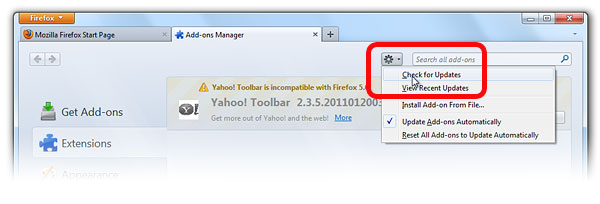

Open the browser to a new page. Blank is best, I guess. Open your file explorer to the folder containing the add-on file. Hold down the right mouse button on the file and slide it to the browser.
Thanks for the screen copy! My panel looks slightly different but I could work it out and my add-on is active now!
Note that simply dragging the XPI file in a Firefox tab or in a tab with the about:addons page would normally be sufficient to trigger the install dialog.