


Windows 10 reached EOS (end of support) on October 14, 2025. If you are on Windows 10, see this article.

Hilfe durchsuchen

Vorsicht vor Support-Betrug: Wir fordern Sie niemals auf, eine Telefonnummer anzurufen, eine SMS an eine Telefonnummer zu senden oder persönliche Daten preiszugeben. Bitte melden Sie verdächtige Aktivitäten über die Funktion „Missbrauch melden“.

Weitere Informationen
Archiviert

How to reduce height of tabs toolbar below 28px?

Tom2025 beantwortet
rodvprt

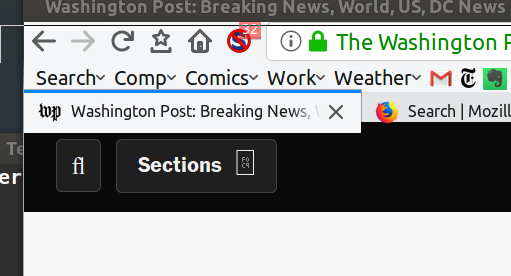
I'm trying to reduce the heights of the various toolbars. I have reduced the height of the bookmarks bar to 18px by editing the userChrome.css file and selecting a compact layout, but I can't get the tabs bar below 28px. Actually, the BAR gets smaller, but the button for the current tab won't reduce below 28px. Attached is an screenshot of this. I've tried all the combinations of height and min-height elements for #TabsToolbar, .tabbrowser-tabs, .tab-text, .tab-throber, .tab-icon-image, .tab-close, .tab-close-button, etc, but nothing works. This is with firefox 57.0.1. What am I missing?
I'm trying to reduce the heights of the various toolbars. I have reduced the height of the bookmarks bar to 18px by editing the userChrome.css file and selecting a compact layout, but I can't get the tabs bar below 28px. Actually, the BAR gets smaller, but the button for the current tab won't reduce below 28px. Attached is an screenshot of this. I've tried all the combinations of height and min-height elements for #TabsToolbar, .tabbrowser-tabs, .tab-text, .tab-throber, .tab-icon-image, .tab-close, .tab-close-button, etc, but nothing works. This is with firefox 57.0.1. What am I missing?
Angefügte Screenshots

Alle Antworten (1)

I have tried this custom CSS without success to change height:

  1. TabsToolbar { height: 20px !important; }

What is the CSS code to reduce the height of both TabsToolbar and Tabs? I want to remove padding to shrink the height.

Geändert am von Tom2025