


I dowloaded the new Firefox Quantum a few days ago now I can't find my Bookmarks menu? Can someone help.

I downloaded the new Firefox Quantum on Tuesday, 11/14/17 and all was fine but today, Saturday, 11/18/17, I cannot locate my "Bookmarks" menu. I need this so can someone please contact me.
edit: removed personal information for your protection. please note that we cannot offer support via telephone, so please continue in the forum. thanks for your understanding! (philipp)
Geändert am von philipp
Alle Antworten (4)
hi, the following steps should get you back to the bookmarking structure you're familiar with :))
- click on the
 library icon and go to bookmarks > bookmarking tools > add bookmarks menu to the toolbar.
- now when you click the
 icon that's newly appearing on the toolbar, you'll get to the same bookmarks menu like in earlier versions...
Hi,
I don't see those 3 vertical black lines and one slightly tilted to the right anymore when I open Firefox. It used to be in the right hand corner but it's gone now.
in this case you can drag the dedicated bookmark menu button ("star on a tray") to the toolbar when you go to the firefox menu ≡ > customize... panel.
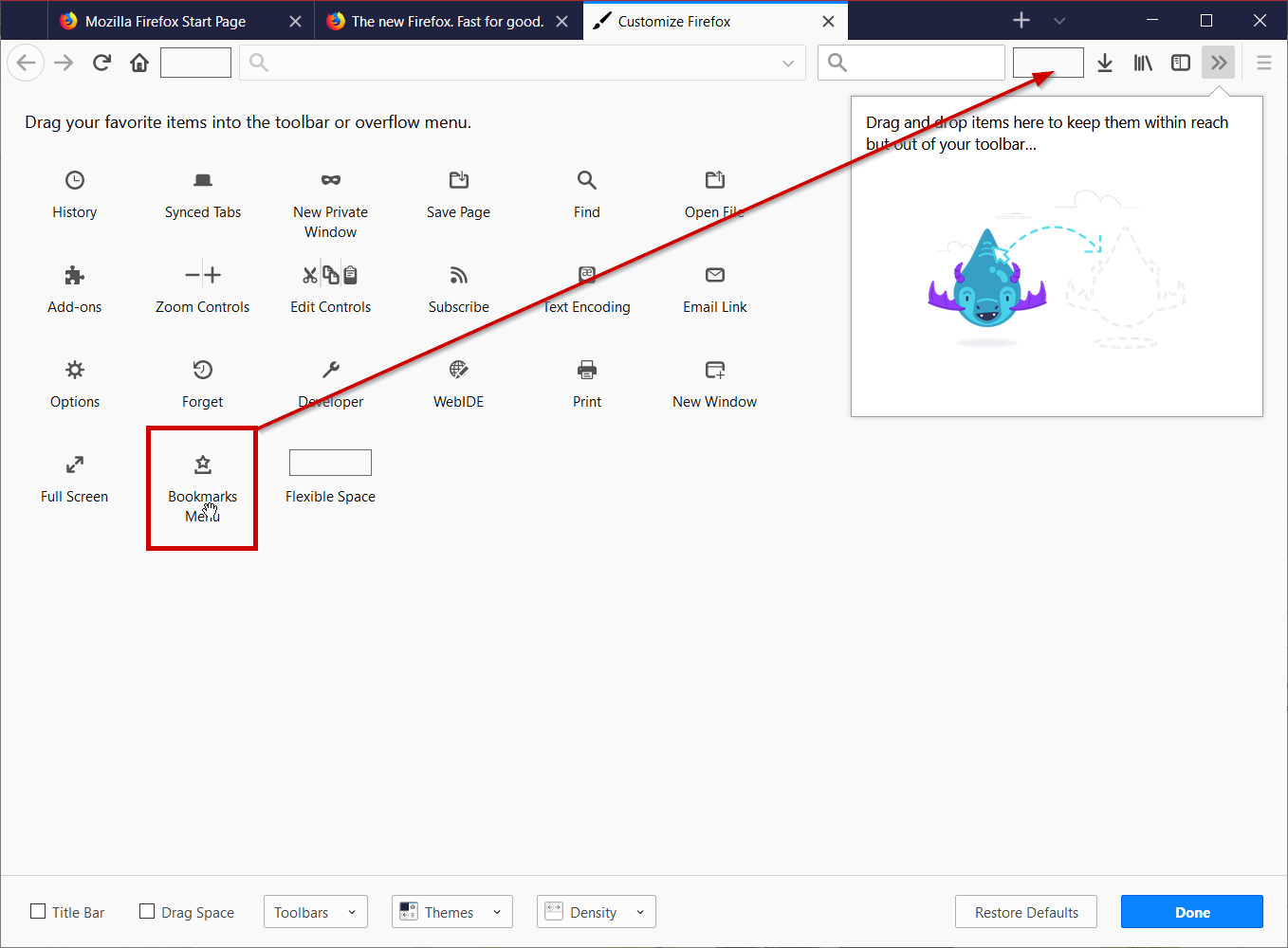
I just went to the "Menu" button and restored defaults and now my "previous" bookmarks icon is at the top right. Thanks for your help.