


When I open a "new private window" it should be a blank page but it keeps coming up with my home page, how can I reset this?

When I open a "new private window" it should be a blank page but it keeps coming up with my home page, how can I reset this?
When I open a "new private window" it should be a blank page but it keeps coming up with my home page, how can I reset this?
Ausgewählte Lösung
It is very strange…
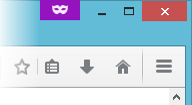
Do you see the purple logo at the top right? (like in the screenshot below)
What happens if you open a Private Window in Safe Mode?
To start Firefox in Safe Mode:
- Click on the menu button in the top right-hand corner
- Click on ? below and select Troubleshooting Information
- Click on Restart with Add-ons Disabled
Alle Antworten (1)

Ausgewählte Lösung
It is very strange…
Do you see the purple logo at the top right? (like in the screenshot below)
What happens if you open a Private Window in Safe Mode?
To start Firefox in Safe Mode:
- Click on the menu button in the top right-hand corner
- Click on ? below and select Troubleshooting Information
- Click on Restart with Add-ons Disabled