


In Thunderbird on my Mac there appears to be no way of restoring alphabetical order to Folders

In Thunderbird on my Mac there appears to be no way of restoring alphabetical order to Folders.
All of my folders under A(and there are a lot of them) have dropped down a few alphabetical letters. There is supposed to be a right click on account name and restore this order, however, like many features on Thunderbird it does not exist now.
So a) why has Thunderbird on my Mac done this and how do I sort it out please?
Alle svar (11)
Hughmoz said
So a) why has Thunderbird on my Mac done this and how do I sort it out please?
It depends on which version of Thunderbird you are using. The option is built-in in the actual release version but not yet in esr versions. If you are running Thunderbird 140.11.0esr version the "Reset Folder Order" is not yet available. It will be in the next major update of the esr version.
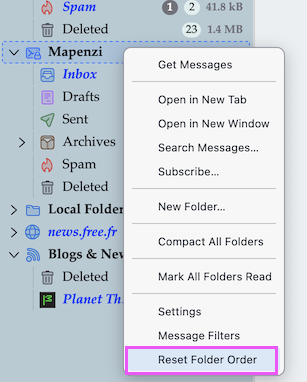
Thanks Mapenzi!
Ah! Having moved a lot of folders manually yesterday, today they have all gone back to the wrong place.
I have never had this issue before in many years of using Thunderbird and the fact that there is not a "Reset Folder Order" is not helpful.
Can I go back to an earlier version to get his sorted until Thunderbird has this option included?
You didn't mention which Thunderbird version you are using actually. In the menu bar click on Thunderbird > About Thunderbird ...
140.11.Oesr
Ændret af Hughmoz den
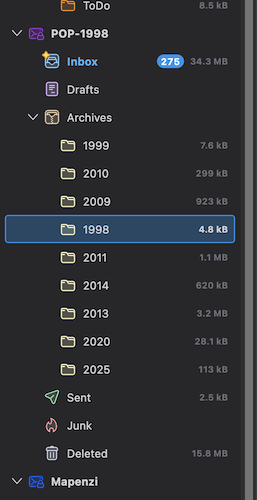
Besides v151 I'm also running v140.11.0esr in its proper profile. I just made a test by moving my 1998 subfolder somewhere amongst the other subfolders in my Archive folder (see image). The 1998 folder stays in its new place even after restart and doesn't move back to its initial place above 1999. Then I quit Thunderbird, removed the folderCache.json file from the profile folder and restarted Thunderbird: this time all subfolders in Archives were back in alphanumeric order.
If you want to test removing the folderCache.json file from your profile folder go to Help > Troubleshooting Information > Profile Folder > Show in Finder... then quit Thunderbird. Remove the file, restart Thunderbird which automatically will create a new folderCache.json file.
Have tried your suggestion twice, but no change in alphabetical order at all.
I tried manually moving all of the A Folders manually, however, they all retunrned to wrong place as soon as quit and reopened.
With which Thunderbird update did your problem begin?
I think that I updated it very recently to newest version.
It is possible that the folderTree.json file in your profile is damaged. As a temporary test mesure you could remove it from your profile folder, but keep it on your Desktop. On restart Thunderbird will create a new folderTree.json file and rearrange folders by default; e.g. all accounts and folders will be collapsed. So if the new folderTree.json file won't solve your alphabetical order issue you can still move your actual folderTree.json file back in your profile folder if you like. All those manipulations must be done while Thunderbird is closed.
I tried this, however, no joy. In the end I added a number 1 after a gap on each folder name and dragged each one into its specific alphabetical order. This worked and everything stayed in order. Now I have just removed the numbers from the name of those folders and all is well. Hopefully the issue with the re-order option will appear soon as, this all takes u oa lot of time when feature are omitted.
Thanks a lot for your help in his matter Mapenzi!