


Thunderbird won't accept my password to internet provider even though I have verified it with hctc.net. What do I do? John Holmes

Thunderbird won't accept my password to my internet provider even though I have verified it with hctx.net. What do I do? John Holmes
Alle svar (3)
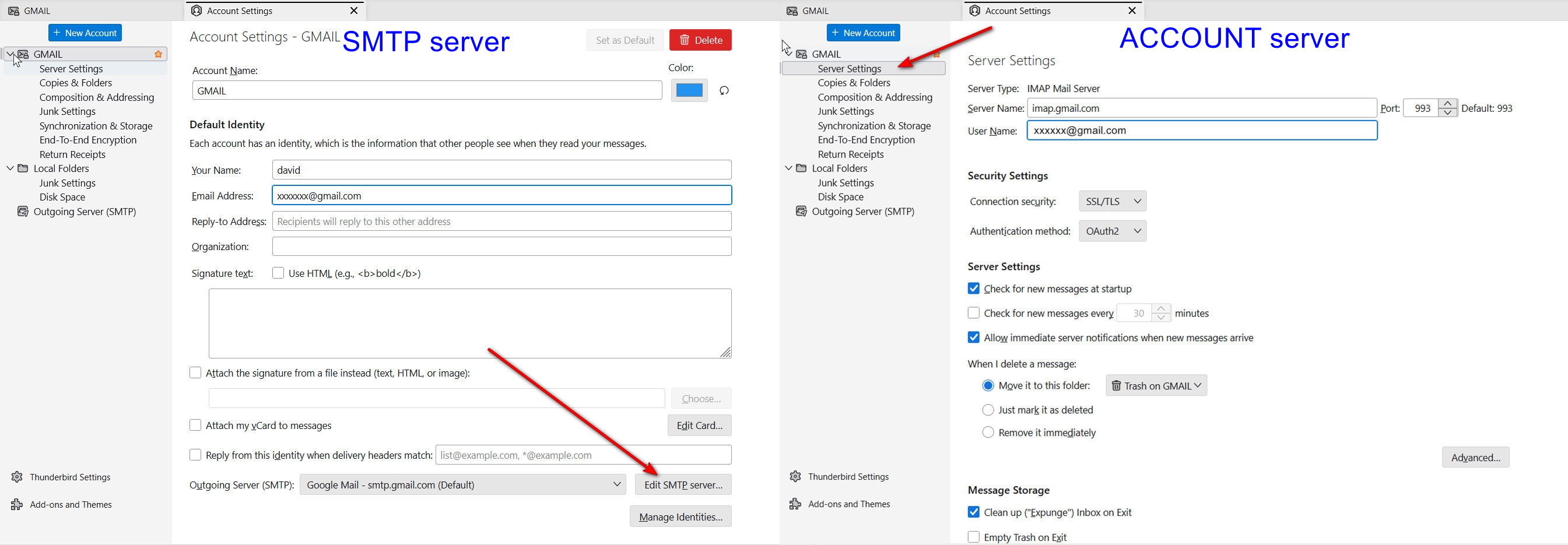
Thunderbird is not rejecting your password, your email provider is. That may happen if the account is not set up properly. For example, people sometimes fail to put their full email address into the server settings pane, and that prevents the email provider from being able to confirm the account. You might check with hctx.net to verify that your settings are correct, including port numbers and authentication requirements. Or, you could post screenshots of exactly what is in your server settings pane and SMTP server settings pane to see if anyone on this forum has suggestions. thank you. I included a screenshot that shows where to find that information.
David, thanks so much for the suggestions. I have been in touch with hctc.net and everything is OK there. I've downloaded a new version of Thunderbird and that solved some of the problems, but I still have some issues. I've run malware scans and rebooted the computer, but the new version is different and I'm still trying to figure out some other issues. At least it recognizes the new password. John
I'm pleased that you're making progress. :)