


Does deleting an email account delete the associated emails?

Clearly, this is a very basic question which has undoubtedly been answered before, but I haven't been able to find it. If Thunderbird had an old-style Help feature with an index, I could probably look it right up. But coming to the forum is the only option the program gives me.
Valgt løsning
That's helpful, and I appreciate the amount of work you went to to type it all out. However, I think the solution I mentioned above is enough for me. I will group the old accounts together at the bottom of the Accounts page. That way, when I go into Accounts, dead accounts will not be interspersed with the active accounts. That was what was getting me annoyed.
Thanks again.
Læs dette svar i sammenhæng 👍 0Alle svar (9)

I'm not sure what you mean by "associated emails", but the answer would be, "no." Deleting one email deletes only that one. However, it would be possible to select multiple message and delete them all with one stroke.
Well, let me say it a little differently.
If my old email AAAAA@BBBBB.COM is no longer in use, can I go into Thunderbird's Accounts section (Tools > Acccount Settings) and delete it without worrying that all of the emails that I sent and received using that address won't be deleted?
I did some experimenting, and it seems that Thunderbird WILL delete all the emails associated with that email address, and frankly, that shocks me. My ISP announced about four years ago that they were no longer offering email addresses, and all email addresses would be deleted from their system. I had about five email addresses using their domain, and frankly, I'm getting tire of looking at them every time I go into Account Settings or send an email in which I have to select my FROM address.
I'll be back later today.
I misread your topic title, sorry...
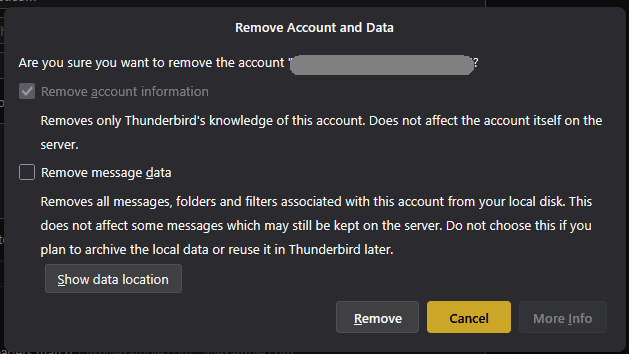
When you delete an email account, you are presented with the opportunity to Remove Message Data or not. Of course, the data is harder to get at, since it's not available in the interface, but it's still there on disk.
A better option, if you still want easy access to those messages, would be to copy them to Local Folders before removing the account.
Ændret af Lin den
Lin, you are right.
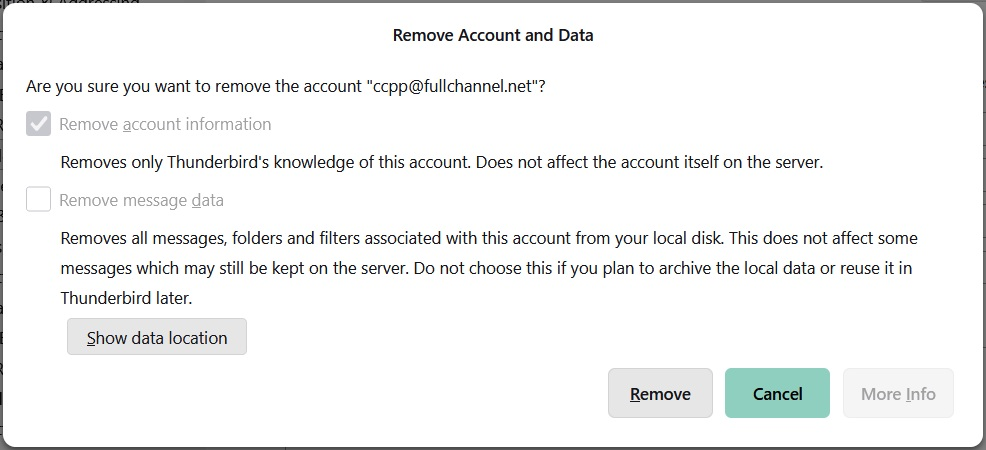
I tried deleting an old email account, and I got the prompt that I am posting below. I assume this prompt means that none of the emails associated with the account (either in or out) will be deleted UNLESS I check the second box. If I am wrong, please let me know, as I don't want to lose any messages.
Thanks for your help.
Ændret af Purebeads den
That is correct, Lin's suggestion lets you keep them visible in Thunderbird. They will be saved within your profile, but not viewable by thunderbird without further actions.
I'm not sure what "but not viewable by Thunderbird without further actions" means. Fullchannel.com used to be the domain I used for my non-business emails, but the owners of that domain cancelled all their customers' email accounts a few years. (They claimed that it is no longer the norm for ISPs to provide email accounts for customers.)
So if I delete all the FullChannel accounts, will I still see the emails in Thunderbird, or will they disappear?
I just discovered that I can accumulate dead email accounts at the bottom of that page, so I am doing that. At least that will get them out of the way, and when I go into Accounts, all the accounts at the top will be active.
If the account is deleted,, yet the messages are retained, thunderbird has no avenue to display them. They will reside in files on your PC, but not viewable. For thunderbird to 'see' them, thunderbird must be 'told' where they are. Here is my suggestion:
- click help>troubleshootinginformation
- scroll to 'profile folder' and click 'open folder'
- EXIT thunderbird
- you are now in the profile, click the Mail folder and then the POP account folder
- here, you should see your message files, such as inbox, inbox.msf, sent, sent.msf, etc.
- COPY each one (ignore the msf entries) and PASTE into the Mail\Local Folders folder (be sure not to overwrite any files with same name)
- restart thunderbird and the messages should all be there.
- now, you technically have TWO copies of the message folders. You can delete the old POP account AND its message folders as you ow have them in Local Folders.
(This is exactly what Lin proposed in first response. All I did here was give the specifics. Funny.... )
Ændret af david den
Valgt løsning
That's helpful, and I appreciate the amount of work you went to to type it all out. However, I think the solution I mentioned above is enough for me. I will group the old accounts together at the bottom of the Accounts page. That way, when I go into Accounts, dead accounts will not be interspersed with the active accounts. That was what was getting me annoyed.
Thanks again.