


videos on some websites no longer play in Firefox

the website gem.cbc.ca no longer allows me to play a video in Firefox since Monday this week, but works as usual on Chrome. I have the same add-ons on both browsers Adblock+ and NoScript. Tried in a private window too and all the suggested Firefox settings, no go.
Also I was able to use primewire.mov to watch videos up until yesterday, but none of them will play for me today. Guess I should try Chrome for them too. I use a private window for those sites.
Windows 10PRO + ESU up to date for April Firefox 150.0.2 64bit No other changes except for an Adblock+ update a few days ago.
Valgt løsning
Hello,
Try Firefox Troubleshoot Mode to see if the problem goes away. Firefox Troubleshoot Mode (previously known as Firefox Safe Mode) is a special diagnostic mode that temporarily turns off hardware acceleration, disables add-ons (extensions and themes) and resets some settings. See the Use Troubleshoot Mode in Firefox article for details.
If Firefox is open, you can restart in Firefox Troubleshoot Mode from the Help menu:
- Click the menu button
 , click Help, select Troubleshoot Mode and click Restart in the "Restart Firefox in Troubleshoot Mode?" dialog that opens.
If Firefox is not running, you can start Firefox in Troubleshoot Mode as follows:
- On Windows: Hold the Shift key when you open the Firefox desktop or Start menu shortcut.
- On Mac: Hold the option key while starting Firefox.
- On Linux: Quit Firefox, go to your Terminal and run firefox -safe-mode
(you may need to specify the Firefox installation path e.g. /usr/lib/firefox)
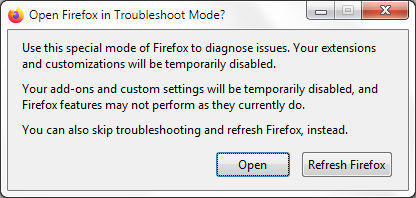
When the Firefox Troubleshoot Mode window appears, select "Open".
If the issue is not present in Firefox Troubleshoot Mode, your problem is probably caused by an extension, theme or hardware acceleration. Please follow the steps in the Troubleshoot extensions, themes and hardware acceleration issues to solve common Firefox problems article to find the cause.
To exit Firefox Troubleshoot Mode, just close Firefox and wait a few seconds before opening Firefox for normal use again. (If you can't exit Firefox Troubleshoot Mode, please see Firefox is stuck in Troubleshoot Mode).
When you figure out what's causing your issues, please let us know. It might help others with the same problem.
Læs dette svar i sammenhæng 👍 0Alle svar (2)
Valgt løsning
Hello,
Try Firefox Troubleshoot Mode to see if the problem goes away. Firefox Troubleshoot Mode (previously known as Firefox Safe Mode) is a special diagnostic mode that temporarily turns off hardware acceleration, disables add-ons (extensions and themes) and resets some settings. See the Use Troubleshoot Mode in Firefox article for details.
If Firefox is open, you can restart in Firefox Troubleshoot Mode from the Help menu:
- Click the menu button , click Help, select Troubleshoot Mode and click Restart in the "Restart Firefox in Troubleshoot Mode?" dialog that opens.
If Firefox is not running, you can start Firefox in Troubleshoot Mode as follows:
- On Windows: Hold the Shift key when you open the Firefox desktop or Start menu shortcut.
- On Mac: Hold the option key while starting Firefox.
- On Linux: Quit Firefox, go to your Terminal and run firefox -safe-mode
(you may need to specify the Firefox installation path e.g. /usr/lib/firefox)
When the Firefox Troubleshoot Mode window appears, select "Open".
If the issue is not present in Firefox Troubleshoot Mode, your problem is probably caused by an extension, theme or hardware acceleration. Please follow the steps in the Troubleshoot extensions, themes and hardware acceleration issues to solve common Firefox problems article to find the cause.
To exit Firefox Troubleshoot Mode, just close Firefox and wait a few seconds before opening Firefox for normal use again. (If you can't exit Firefox Troubleshoot Mode, please see Firefox is stuck in Troubleshoot Mode).
When you figure out what's causing your issues, please let us know. It might help others with the same problem.
Phantom, thanks for responding. Troubleshoot mode was the first thing I tried for the cbc.gem site, it did not work in troubleshoot mode either, yesterday I updated Firefox. Today troubleshoot mode worked for the ads/video. As I stated in the first post I had tried everything suggested online to fix the problem. Yesterday I watched 7 episodes on cbc.gem using Chrome, then today AdBlock+ updated on Chrome and the videos will no longer work for me there. Seems the cbc.gem site has found a way to block AdBlock+ on both Firefox and Chrome with the latest AdBlock+ update. I'll post on their help forum, maybe they can fix it.
As to the primewire website it seems that only 1 video will not play for me on either browser, on any of the links they provide as I was able to watch another today as a test. I would not go to that website without both AdBlock+ and NoScript enabled. Thank goodness for reviews I can find online of the episodes I will not be able to watch.
I'll mark this as solved as it is obviously not just a Firefox problem, it is the extensions problem.