


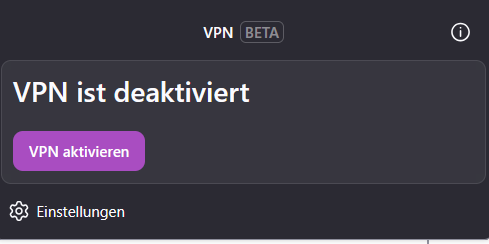
I'm logged in, but when I click on activate the Firefox internal VPN does not activate. Nothing happens!

I'm logged in, but when I click on activate the Firefox internal VPN does not activate. Nothing happens!
Alle svar (4)
Hi Ike,
I'm probably stating the obvious here. But have you tried restarting the browser to see if it help?
Really?! xD Well, I know a little bit more about IT to not figure out that solution.
But yes, I updated Firefox, I updated OS, I'm looged in, I restarted the browser, I restarted the computer. So let's assume that I've went through the IT basics to try to solve the issue. Let's take a closer look e.g. at the settings. Is there something I have to enable. Or, if I've been hardening the Browser, is are there settings that may interfere with the VPN? Or plugins like ad-blockers, etc that may interfere? And yes, I disabled all other VPN, PiHole, Unbound, UFW to figure out the solution.
In case you never heard of anything I'm talking about, I appreciate your try to help me, but keep in mind, that I know more than the ordinary front end user. Thanks. :)
Hi Ike,
No offense there. It always help for us to know what kind of troubleshooting steps you've taken so we can avoid recommend you the same thing and give you a more appropriate solution.
2 things strikes me:
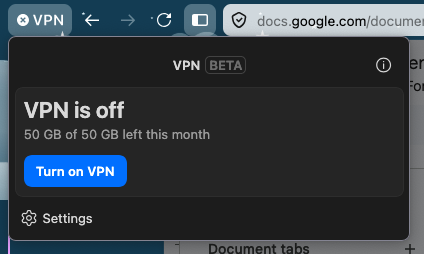
- On my end, there's a bandwidth indicator in the VPN panel just right above the button to enable VPN. (see the attached picture. It looked like you don't have that incicator, so I'm curious, have you managed to enable it in the past and now you can't? Or it's always been like this since you first try this feature.
- I noticed that the button looked different too (yours is purple, while mine is blue). I wonder if you're using css customization. Otherwise, can you tell me where did you install Firefox from?
Let me tryto recap my steps since "day one", which may answer both questions.
My laptop is quite new (but I'm using Firefox since a couple of years), so when setting it up, I downloaded Firefox from the official homepage and installed it via the provided installer. After that hardened it:
about:config settings: network.trr.mode = 5 (DoH disabled, since Pi-hole handles DNS) dom.webrtc.enabled = false (prevents WebRTC IP leaks) privacy.resistFingerprinting = true toolkit.telemetry.enabled = false datareporting.healthreport.uploadEnabled = false browser.send_pings = false Installed extensions: uBlock Origin (second layer behind Pi-hole) ClearURLs (strips tracking parameters from URLs) Bitwarden (password manager)
A couple of days ago Firefox flagged the new internal VPN Extension, which I wanted to try. I installed it, logged into my profile, clicked the button and... nothing happened.
May it possible that "privacy.resistFingerprinting = true" is blocking that UI feature? But all other extensions are working fine. Other options may be that, network.trr.mode = 5 could interfere with the VPN activation flow if the plugin relies on DoH for endpoint resolution or uBlock Origin or ClearURLs could be blocking telemetry or activation calls from the VPN. Have you heard about issues or interfences here?
Best