


Windows 10 reached EOS (end of support) on October 14, 2025. If you are on Windows 10, see this article.

Søg i Support

Avoid support scams. We will never ask you to call or text a phone number or share personal information. Please report suspicious activity using the “Report Abuse” option.

Læs mere
Åben

unable to connect to the outgoing (SMTP) server smtp.gmail.com

Duncan Murdoch replied
Midori Takajo

Hello everyone

It's been for a few days since somehow it became unable to send mail. The error message is "The message could not be sent because we were unable to connect to the outgoing (SMTP) server smtp.gmail.com. The server may be unavailable, or the SMTP connection may have been rejected. Please verify that your outgoing (SMTP) server settings are correct and try again. Problem is I cannot see any mistake in my smtp setting. Some help much appreciated. Thank you.

Taka Jimbo
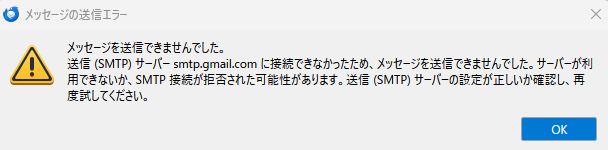
Hello everyone It's been for a few days since somehow it became unable to send mail. The error message is "The message could not be sent because we were unable to connect to the outgoing (SMTP) server smtp.gmail.com. The server may be unavailable, or the SMTP connection may have been rejected. Please verify that your outgoing (SMTP) server settings are correct and try again. Problem is I cannot see any mistake in my smtp setting. Some help much appreciated. Thank you. Taka Jimbo
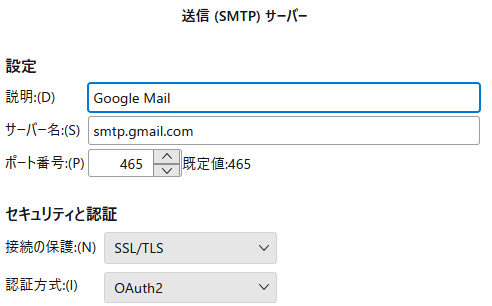
Vedhæftede skærmbilleder

Alle svar (3)

I chatted with someone today, who regained function by deleting the account's password from Thunderbird.

Does that help?

Deleting passwords sound a bit risky, but if it works... thank you.

I have the same problem, but I'm not using a password, I'm using Oauth2 authentication. The authentication dialog never pops up.

Stil et spørgsmål

Du skal logge ind på din konto for at svare på et indlæg. Start et nyt spørgsmål, hvis du ikke har en konto endnu.