


2 140esr updates in a week wiped out of all my accounts and emails

Twice in one week a complete wipeout of all my accounts and emails, hours spent restoring my information after the first update, now a second one, do you do not care about the users of this product? and you wonder why you don't get donations when you wipe out everything and give NO instructions on how to avoid all this. Where is the version hidden?
Ændret af Wayne Mery den
Alle svar (6)
Please tell us:
- Which AV software you are using on Windows 10?
- At help > Troubleshooting Information > about:profiles, how many profiles are show and what are their names? (for example default, default-release, etc)
- Does this only happen when Thunderbird updates?
- I don't understand your question about version being hidden - please elaborate.
Application Basics
   Name: Thunderbird
   Version: 140.9.0esr
   Build ID: 20260320073352
   Distribution ID:
   Update Channel: esr
   User Agent: Mozilla/5.0 (Windows NT 10.0; Win64; x64; rv:140.0) Gecko/20100101 Thunderbird/140.9.0
   OS: Windows_NT 10.0 19045
   OS Theme:
   Launcher Process: Enabled
   Multiprocess Windows: 0/0
   Fission Windows: 0/0
             Enabled by default
   Remote Processes: 4
   Enterprise Policies: Inactive
   Google Location Service Key: Missing
   Google Safebrowsing Key: Missing
   Mozilla Location Service Key: Missing
   Safe Mode: false
   Memory Size (RAM): 7.9 GB
   Disk Space Available: 278 GB
 Mail and News Accounts
   account1:
     INCOMING: account1, , (imap) imap.gmail.com:993, 3, OAuth2
     OUTGOING: , smtp.gmail.com:465, 3, OAuth2, true
   account2:
     INCOMING: account2, , (none) Local Folders, 0, 3
   account3:
     INCOMING: account3, , (imap) outlook.office365.com:993, 3, OAuth2
     OUTGOING: , smtp-mail.outlook.com:587, 2, OAuth2, true
Libraries
     Library
     Status
     Expected minimum version
     Version in use
     Path
       RNP (OpenPGP)
       OK
       0.17.1
       0.17.1.MZLA.140.9.0esr.botan
       C:\Program Files\Mozilla Thunderbird\rnp.dll
       OTR
       Failed to load. OTR chat encryption will not work.
       -
       -
       -
Calendar Settings
Home
       Name
       Value
       Name:
       Type: storage
       Disabled: true
       Username:
       URI:
       Refresh Interval:
       Read-only:
       Suppress Alarms:
       Cache Enabled:
       iMIP Identity: id1
       iMIP Disabled:
       iMIP Account:
       Organizer Id:
       Force Email Scheduling:
       Popup Alarms Supported:
       Alarms on Invitation Supported:
       Max Alarms Per Event:
       Attachment Supported:
       Max Categories:
       Privacy State Supported:
       Priority Supported: true
       Event Supported:
       Task Supported:
       Local Time Supported:
       UTC/GMT Supported:
       Auto-Scheduling Supported:
james olenick
       Name
       Value
       Name:
       Type: caldav
       Disabled:
       Username:
       URI:
       Refresh Interval: 30
       Read-only: false
       Suppress Alarms: false
       Cache Enabled: false
       iMIP Identity: id1
       iMIP Disabled:
       iMIP Account:
       Organizer Id:
       Force Email Scheduling:
       Popup Alarms Supported:
       Alarms on Invitation Supported:
       Max Alarms Per Event:
       Attachment Supported:
       Max Categories:
       Privacy State Supported:
       Priority Supported:
       Event Supported: true
       Task Supported: false
       Local Time Supported:
       UTC/GMT Supported:
       Auto-Scheduling Supported: true
Holidays in United States
       Name
       Value
       Name:
       Type: caldav
       Disabled:
       Username:
       URI:
       Refresh Interval: 30
       Read-only: false
       Suppress Alarms: false
       Cache Enabled: false
       iMIP Identity: id1
       iMIP Disabled:
       iMIP Account:
       Organizer Id:
       Force Email Scheduling:
       Popup Alarms Supported:
       Alarms on Invitation Supported:
       Max Alarms Per Event:
       Attachment Supported:
       Max Categories:
       Privacy State Supported:
       Priority Supported:
       Event Supported: true
       Task Supported: false
       Local Time Supported:
       UTC/GMT Supported:
       Auto-Scheduling Supported: true
Crash Reports for the Last 3 Days
Remote Processes
Type: Count
     Extension: 1
     GPU: 1
     RDD: 1
     Isolated Web Content: 1
Add-ons
     Name
     Type
     Version
     Enabled
     Location
     ID
       Amazon.com
       extension
       1.1
       true
       app-builtin
       amazondotcom@search.mozilla.org
       Bing
       extension
       1.0
       true
       app-builtin
       bing@search.mozilla.org
       DuckDuckGo
       extension
       1.0
       true
       app-builtin
       ddg@search.mozilla.org
       Google
       extension
       1.0
       true
       app-builtin
       google@search.mozilla.org
       Provider for Google Calendar
       extension
       128.5.11
       true
       app-profile
       {a62ef8ec-5fdc-40c2-873c-223b8a6925cc}
       Wikipedia (en)
       extension
       1.0
       true
       app-builtin
       wikipedia@search.mozilla.org
       System theme — auto
       theme
       1.4.1
       true
       app-builtin
       default-theme@mozilla.org
       Dark
       theme
       1.3
       false
       app-builtin
       thunderbird-compact-dark@mozilla.org
       Light
       theme
       1.3
       false
       app-builtin
       thunderbird-compact-light@mozilla.org
Security Software
Type: Name
     Antivirus: Microsoft Defender Antivirus
     Antispyware:
     Firewall: Windows Firewall
Legacy User Stylesheets
   Active: false
   Stylesheets: No stylesheets found
Graphics
     Features
     Compositing: WebRender
     Font Visibility Debug Info: Windows Platform
     Asynchronous Pan/Zoom: wheel input enabled; scrollbar drag enabled; keyboard enabled; autoscroll enabled; smooth pinch-zoom enabled
I am sending 2 replies due to not understanding your profile question when it is not listed under menu you suggested I use VSL for video, and MS for audio It has only happened with this last 2 updates and I lost access to a work webmail due to lost password, which I still have not been able to recover. When a required information is asked for and it is hidden 4 menus deep, an accurate path would be appreciated. Much like your request for "profile" information, that is why you got that in a previous email.
How about a tutorial or just a button that would back up all our information?
kcjim said
How about a tutorial or just a button that would back up all our information?
It always good to back up your information. Easily searched for - begin in Thunderbird > Help > Get Help > type in "backup" > select "Help articles only".
kcjim said
When a required information is asked for and it is hidden 4 menus deep, an accurate path would be appreciated. Much like your request for "profile" information, that is why you got that in a previous email.
I don't get to determine the depth.
You have two choices:
1. Begin in Thunderbird > Help > Troubleshooting Information > find about:profiles (you can use ctrl+F to search for it) > click about:profiles. How many profiles are show and what are their names? (for example default, default-release, etc)
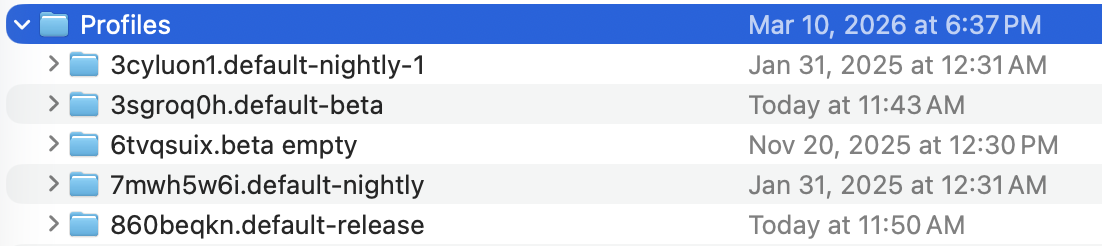
2. Begin in Thunderbird > Help > Troubleshooting Information > find "Profile Folder" (you can use ctrl+F to search for it) > click "Show..." > move up one directory to "Profiles" > screen shot the Profiles directory. For example this is what I see on my Mac ...
Ændret af Wayne Mery den