


Reguarly are big problems with sending email

Reguarly with some month between I can´t send email. After many days, which is impossible to use, it is ok without doing anything.
Haven´t manage to send in many days and now it is huge problem.
When I click on send buttom on the email come text about the fail which is 100% wrong.
It say: An error occurred while sending mail. The mail server responded: (then come my email adress): Sender adress rejected: not owned by (the part of my adress in front of @) Please check the message recipient (my email adress) and try again.
This text is 100% wrong because all things is as always! Never changed it. And seeing it in setting it like it should be!
I am almost given up, this come always with months between and that is hopeless.
Please help!
Valgt løsning
It works now, sorry for late reply.
The only annoying things is that I need to write the password almost each time I send a post. Have the feeling that it was part of the problem in the end, was late to change in the new one.
So more and less no problem now, thank you for the help. Will change to outlook but at least I can send thing till then.
Læs dette svar i sammenhæng 👍 0Alle svar (12)
Please post screenshot of account's 'server settings' pane, and also of SMTP server settings pane. That may prove helpful.
The red cover have the right ending in the email adress.
I really doubt it is the problem becuase it have never been changed. And I know about another with excatly the same problem. I am almost given up on this software.
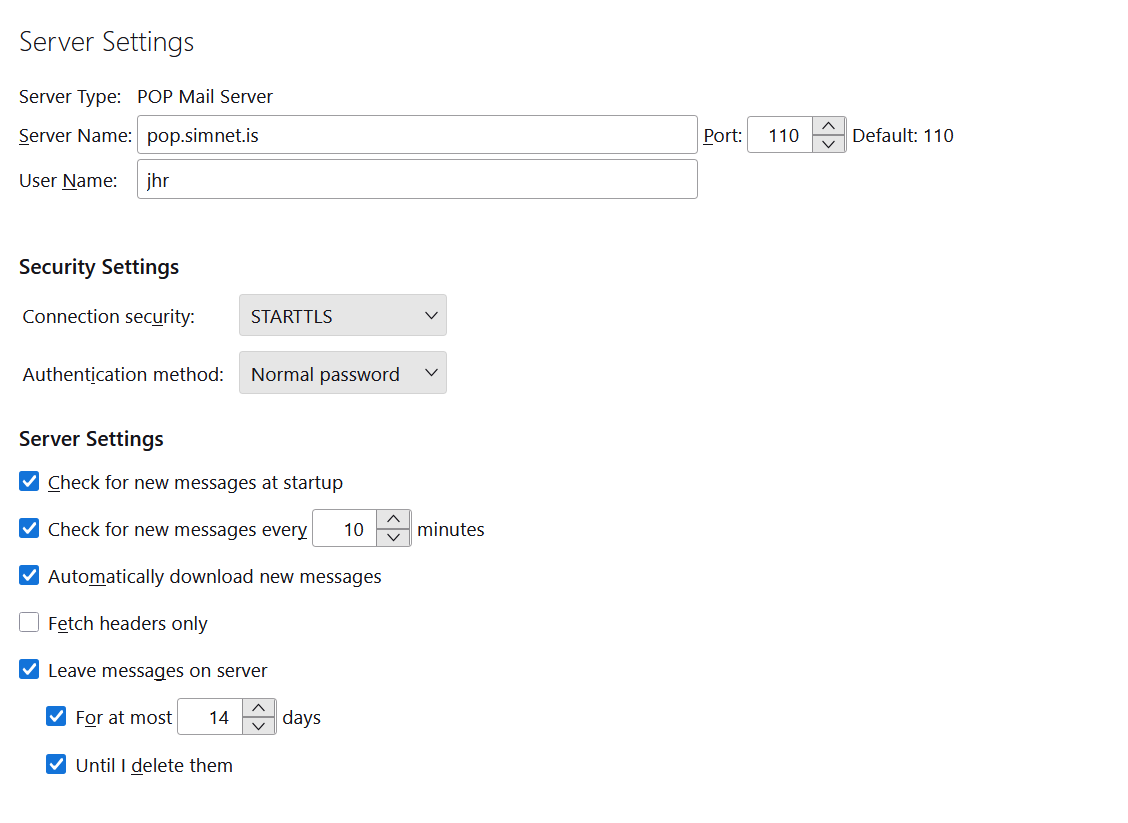
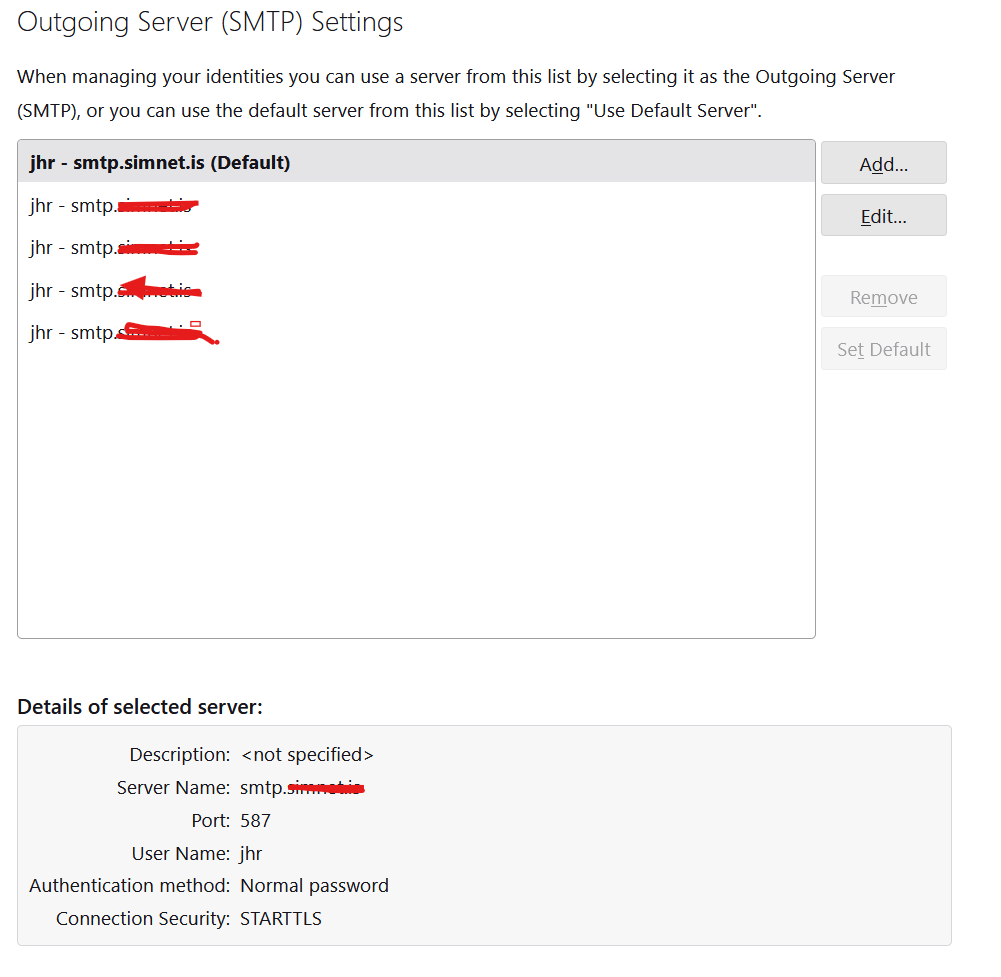
I see two possible problems: - normally, email providers want the full email address in settings, yet you just have jhr as user name. Using the full email address should be tried. I also suggest changing port 110 to 995 and authentication to SSL/TLS. - also, your other screenshot indicates you have four email accounts with the provider. It is possible that you have the wrong SMTP server set for the accounts. You did not create a screenshot of the SMTP server setting. You can check that with these steps: - click ';account settiings' - highlight the account name in question in left sidebar - now, on lower right side of screen is a button 'edit SMTP server' click that - it should show the email address associated with that particular account. My guess is that it does not. I suggest also putting the full email address in the DESCRIPTION field for documentation, set port to 465 and authentication to SSL/TLS. - I also suggest repeating this for all four accounts. Each SMTP server pane must reflect the email address of the account, and your post indicated you are receiving message that it is set wrong.
After change, please post back with any error messages and screenshot of SMTP server settings pane for the account.
Strange when man had never change things that had work all this years! But I had tried this (some of this things was there). I took out 2 adress. And now I can´t do anything because I need password and althe I had used don´t works. So I don´t know if it has worked or not!
I do not know what you did in detail, nor am I sure what the problem is now. Please restate what you can or cannot do with thunderbird, and post screenshot of server settings pane of the account and the SMTP server settings pane. Thank you
Not trying to be negative but this was all wrong! Now it works, should be like this, in my case at least. The only problem is that I don´t know how to change default in the port from 995 to 993. I write 993 but it don´t change
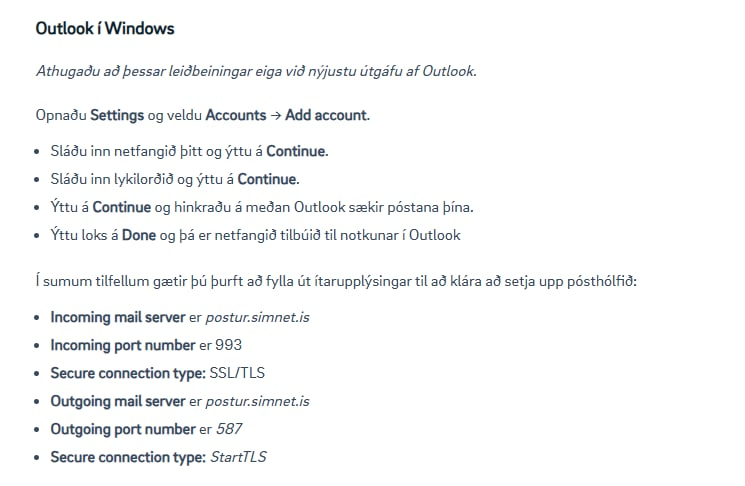
I found from server, yes it is POP. But 995 don´t works, they are clear about 993. The problem is that the software don´t change to 993, not possible to change default.
So now I can send but not get!
Change to Outlook tonight but need to solve this even so
Please post a screenshot of the server settings pane. That may generate ideas.
This was a strange rollecaster which took a lot of time. And the port was the strangest. Strange to say it but I had the feelings that it changed a lot. Know it can´t be but it looks like that.
They key thing was to change the smtp to pop
I don´t have the technical knowledge in this but I needed to change password and it looks like it too incredible time to come in. Should I have sign out with other method that just close? Could not see sign out but didn´t search for long time.
The red line is my full email adress. Not sure if it was a thing because I had never used that complete. But as you stress it I changed it.
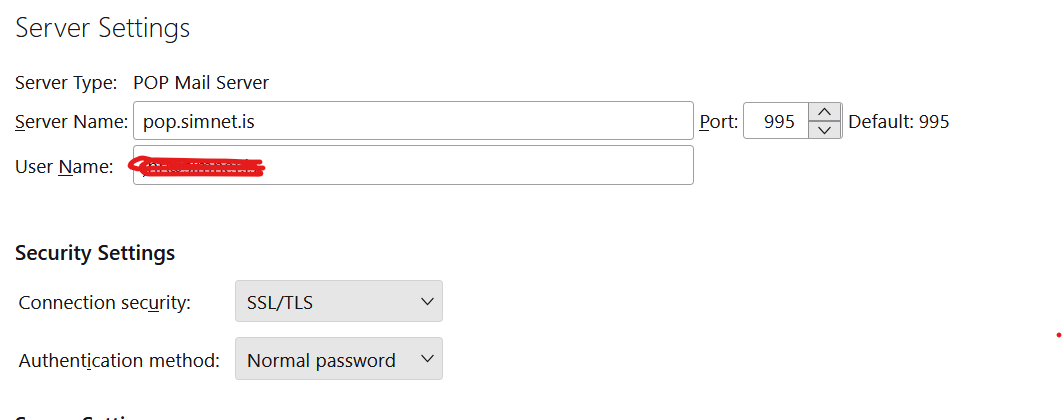
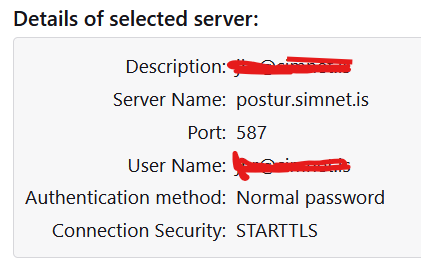
Now that we 'may' have the right settings, please post again what the problem now is. That is, can you receive mail? Can you send mail? what is the full text of error messages? thank you
Valgt løsning
It works now, sorry for late reply.
The only annoying things is that I need to write the password almost each time I send a post. Have the feeling that it was part of the problem in the end, was late to change in the new one.
So more and less no problem now, thank you for the help. Will change to outlook but at least I can send thing till then.