


Automatic updates ignoring settings

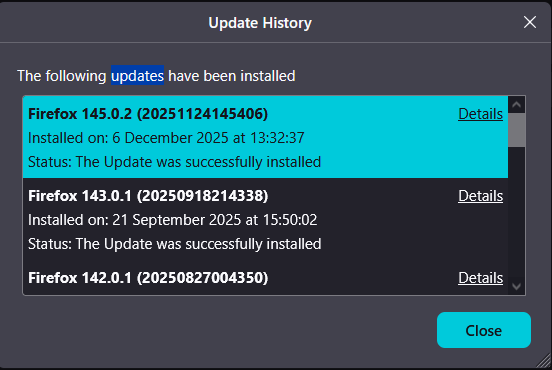
I have automatic updates disabled, for the last month or longer I have refused to update Firefox and kept dismissing the notice when I start up my Firefox. Yesterday when I opened Firefox it just updated itself automatically and without even asking if I want to download the update. I tried to find a way to contact support but all I can find is posting a question on here, so hopefully someone can help me with this question: Why did Firefox ignore my update settings and download and install an update I have been denying for weeks now, and how can I prevent it from happening again?
I am on windows 10
Alle svar (5)
Agent virtuel said
Hello Take a look at this question https://support.mozilla.org/en-US/questions/1551227
How does this apply? I want to know why Firefox updated itself automatically yesterday while I have automatic updates disabled and have been carefully dismissing all the update notifications since end of September (went into update history to check it), and how to stop it from updating itself again.
Your Firefox updated itself automatically, i don't know why.
https://support.mozilla.org/en-US/kb/file-bug-report-or-feature-request-mozilla If you wish, you can file a bug report.
Firefox. https://bugzilla.mozilla.org/describecomponents.cgi?product=Firefox
For information purposes, you can try, DisableAppUpdate. https://connect.mozilla.org/t5/discussions/upgrade-notification-spam/m-p/64080/highlight/true#M22529
By way of illustration. https://www.youtube.com/watch?v=wiWZOm_UX30
Agent virtuel said
Your Firefox updated itself automatically, i don't know why. https://support.mozilla.org/en-US/kb/file-bug-report-or-feature-request-mozilla If you wish, you can file a bug report. Firefox. https://bugzilla.mozilla.org/describecomponents.cgi?product=Firefox For information purposes, you can try, DisableAppUpdate. https://connect.mozilla.org/t5/discussions/upgrade-notification-spam/m-p/64080/highlight/true#M22529 By way of illustration. https://www.youtube.com/watch?v=wiWZOm_UX30
Thank you for your answer, I was not aware of the policies.json option, and have implemented it now, hopefully that will prevent any future bugs from happening again. I will also look into posting a bug report on Bugzilla.
Many years ago, the developers added a fail-safe feature to update Firefox if it got too out-of-date. This was done because the internal updater was failing for many users. I don't know whether that still exists, or whether it is relevant to your Firefox update.
In my own case, it seems that even if I snoozed the update several times, opening a different profile could trigger installation in the background. If you use more than one profile, maybe you ran into that behavior.