


Firefox URL Bar Border Radius - too rounded now

Hi all,
I just updated from v143.0.3 to v145.0 and once again some small breakages in my userChrome.css have occurred.
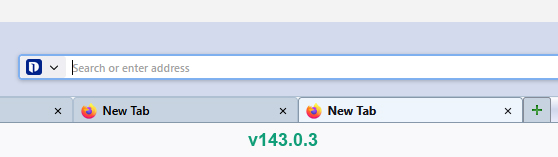
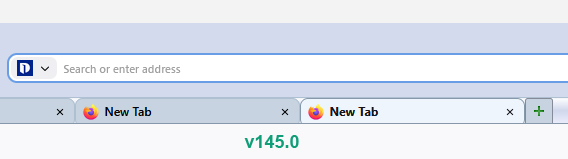
Things have become too rounded, including tabs, the URL bar, and the chevron button.
I've solved the tabs radius issue with the .tab-background {} selector.
However, my URL bar now has rounded corners. I would like it to be square.
Please see the attached images for before & after views of my URL bar.
I have this code in place...
#urlbar > #urlbar-background, #urlbar[breakout][breakout-extend] > #urlbar-background, #searchbar
{ border: 1px solid #a1a6b5 !important; outline: none !important;   border-radius: 0px !important; }
I've also tried this as a standalone...
#urlbar-background {
  border-radius: 0px !important;
}
But the above has no effect, although it did previously.
Is there a new way to control the radius of the URL bar?
Also, my chevron button became too rounded. Is there a new way to control that as well?
Thanks.
Alle svar (1)
Hello
Maybe, you can ask the community. https://www.reddit.com/r/FirefoxCSS
A subject. https://www.reddit.com/r/FirefoxCSS/comments/1ov0806/does_anyone_know_how_we_can_unround_our_tabs
And, for information purposes. https://support.mozilla.org/en-US/questions/1546836#answer-1778873