Not able to receive and send emails

Could anybody help me? Since yesterday morning I have not been able to send or receive emails on Thunderbird.
I have two computers: a laptop and a desktop. On both of them I use Thunderbird as my main email service. On the desktop I also have MS Outlook. I am able to send and receive emails on the desktop on MS Outlook.
Error message on the desktop when I try to send a test email: Sending message failed. The message could not be sent because the Outgoing server (SMTP) mail.rushmore.com failed. The server may be unavailable or refusing SMTP connection. Please verify that your Outgoing server (SMTP) settings are correct and try again.
Error message on the laptop when I try to send a test email: You are about to override how Thunderbird identifies this site. Legitimate banks, stores, and other public sites will not ask you to do this. Location: mail.rushmore.com:587 [get certificate] This site attempts to identify itself with invalid information. Outdated information The certificate is not currently valid. It may have been stolen or lost, and could be used by someone to impersonate this site. [check] [Permanently store exception]
[Confirm Security Exception] [Cancel]
Interestingly, yesterday I was receiving the same error message on the desktop computer, except the number under Location mail.rushmore.com: was different (not 587). I do not remember what this number was.
My current SMTP server settings: Server name: mail.rushmore.com Port: 465 (Default: 465) Connection security: SSL/TLS Authentication method: Normal password User Name: halina@rushmore.com
Please let me know what I can do about this. Thank you!
Halina Hladysz
Valgt løsning
Alle svar (2)
Please help me! I have expanded information I sent few days ago.
1. Problem which needs to be solved: Starting on Saturday morning (October 18th) I have not been able to send or receive emails on Thunderbird. (I turn down my entire network for the night. On Friday evening, before I turned it down, I was still using Thunderbird without any problems. On Saturday morning, after turning the network up, Thunderbird did not work.)
I have two computers: a laptop and a desktop. On both of them I use Thunderbird for most of my emails. They have Windows 10 operating system. Thunderbird stopped working on both computers and at the same time.
2. MS Outlook still works On the desktop I also have MS Outlook. I am able to send and receive emails on the desktop on MS Outlook. There was no break in this software package working.
3. What happened in my email correspondence prior to this problem For about one week prior to Thunderbird’s stopping to work I received numerous emails – which appeared to be sent from my email address xxx@rushmore.com. These emails were pretending to be sent from various companies, including some warnings about my email which needs to be reconfigured or something like this. I deleted all these emails immediately without clicking on any links they would send. Unfortunately, my email provider (BluePeak company) did not catch these emails; they should had been sent to the SPAM folder on their server.
I suspect that some of these emails, or one of these emails, created this problem. A virus?
I have done a full virus scan and it found no problem.
4. Error messages on the desktop when I try to send a test email:
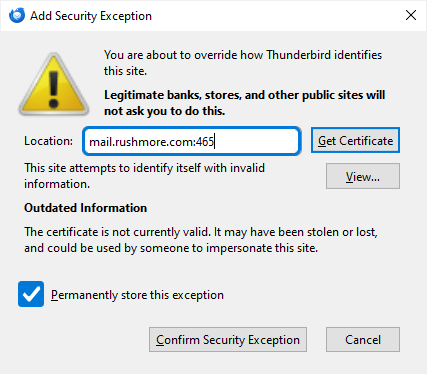
See uploaded image 1
Here is the wording of this error message: You are about to override how Thunderbird identifies this site. Legitimate banks, stores, and other public sites will not ask you to do this. Location: mail.rushmore.com: 465 [get certificate] This site attempts to identify itself with invalid information. Outdated information The certificate is not currently valid. It may have been stolen or lost, and could be used by someone to impersonate this site. [check] [Permanently store exception]
[Confirm Security Exception] [Cancel]
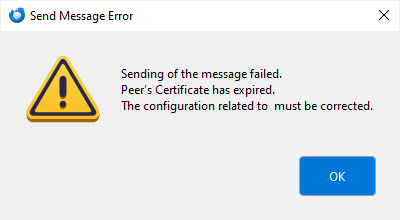
When I click on [Cancel] I get this message (see uploaded image 2): Sending the message failed Peer's Certificate expired The configuration related to must be corrected.
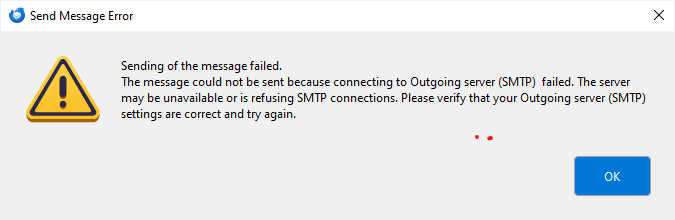
Sometimes, however, these error messages do not show on the desktop. The desktop error message then says (see uploaded image 3):
Sending message failed. The message could not be sent because the Outgoing server (SMTP) mail.rushmore.com failed. The server may be unavailable or refusing SMTP connection. Please verify that your Outgoing server (SMTP) settings are correct and try again.
5. Error messages on the laptop when I try to send a test email: On my laptop the error messages are the same, except the number in the [Location] section is different; it is 587 on the laptop (versus 465 on the desktop).
6. My current SMTP server settings: Server name: mail.rushmore.com Port: 465 (Default: 465) Connection security: SSL/TLS Authentication method: Normal password User Name: halina@rushmore.com
Could one of you help me, please? I am completely “frozen” with being able to work on some of my projects; one important is organizing a big event and all my communication (high number of emails by now) are on Thunderbird.
Thank you!
Halina H.