

Denne tråd blev arkiveret.
Stil et nyt spørgsmål, hvis du har brug for hjælp.

Arkiveret
Issue with new feature "add tab to taskbar" - does not work with outlook.live.com
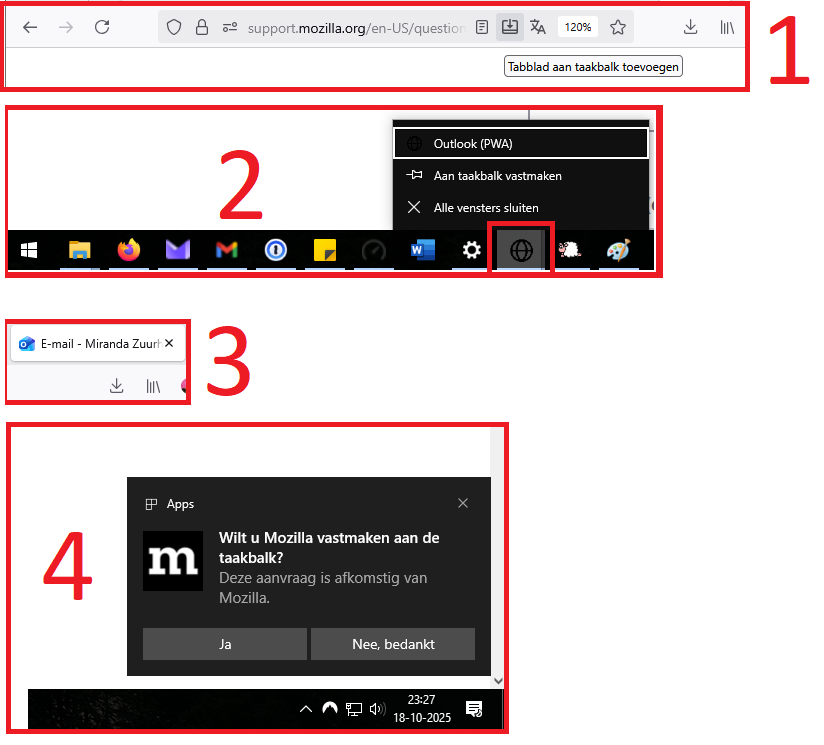
I am very happy with pinning websites to the taskbar. It is very practical to have your mailbox on a solo tab on your taskbar. (picture 1)
However, I discovered that adding the outlook.live.com website to the taskbar does not work properly. The icon (picture 2 and 3) is not shown, unlike the Proton and Gmail icon.
Also the Windows message does not show: "Apps" 'Do you want to add ... to the taskbar?' 'Yes' 'No, thanks'. (picture 4)
I am very happy with pinning websites to the taskbar. It is very practical to have your mailbox on a solo tab on your taskbar. (picture 1)
However, I discovered that adding the outlook.live.com website to the taskbar does not work properly. The icon (picture 2 and 3) is not shown, unlike the Proton and Gmail icon.
Also the Windows message does not show: "Apps" 'Do you want to add ... to the taskbar?' 'Yes' 'No, thanks'. (picture 4)
Alle svar (1)
For clarity, this is the feature: https://support.mozilla.org/en-US/kb/web-apps-firefox-windows