


Windows 10 reached EOS (end of support) on October 14, 2025. If you are on Windows 10, see this article.

Søg i Support

Avoid support scams. We will never ask you to call or text a phone number or share personal information. Please report suspicious activity using the “Report Abuse” option.

Læs mere
Arkiveret

CPU Usage in Tray

noel_envode

I wonder if anyone out there is familiar with this little utility I've had for many years, "CPU Usage in Tray", by edgemeal software. It's development ceased long ago.

It's still works in Windows 10, for the most part, but it has a tendency to involuntarily and randomly close.

I looking for a possible way to solve what must be incompatibility related, or look for a simple replacement.

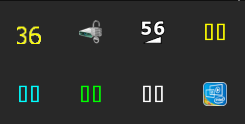
This is what it looks like in the tray

The four "00"'s represent the cpu cores usage. Then the second image demonstrates the ongoing fluctuations. That's the kind of display I'd like to duplicate.

I don't necessarily need have to show all four cores displayed. One is fine, I tried to get the task manager to do it, but no luck there.

I wonder if anyone out there is familiar with this little utility I've had for many years, "CPU Usage in Tray", by edgemeal software. It's development ceased long ago. It's still works in Windows 10, for the most part, but it has a tendency to involuntarily and randomly close. I looking for a possible way to solve what must be incompatibility related, or look for a simple replacement. This is what it looks like in the tray The four "00"'s represent the cpu cores usage. Then the second image demonstrates the ongoing fluctuations. That's the kind of display I'd like to duplicate. I don't necessarily need have to show all four cores displayed. One is fine, I tried to get the task manager to do it, but no luck there.
Vedhæftede skærmbilleder

Alle svar (1)

Hi noel_envode, Here's a good site to look for a possible "simple replacement":

https://alternativeto.net/