


cannot open my Xfinity/comcast e-mail

cannot break preview e-mail page to "full email page";Xfinity page freezes up then second later returns to the preview email page; cannot access "preferences".;this does not happen when I use internet explorer; if you can't resolve this problem, I will have to use IE instead of Firefox!
Chosen solution
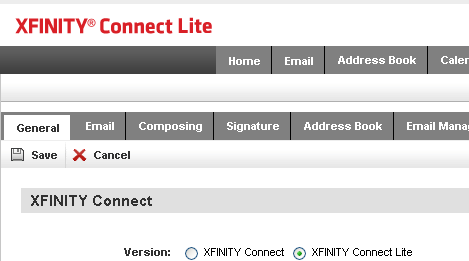
Using IE, once you're in the full email page open Preferences -> General in the Xfinity menu header and select Xfinity Connect Lite. Then try it in Firefox.
Read this answer in context 👍 8All Replies (4)
Is anyone there?? There is suppose to be support from 5PM EDT to 9 PM
Modified by g.glassman
Chosen Solution
Using IE, once you're in the full email page open Preferences -> General in the Xfinity menu header and select Xfinity Connect Lite. Then try it in Firefox.
edmeister. Your solution worked perfectly Thanks!
What do I do when I click on preferences and nothing happens. Blank page.