


Thunderbird set up

Hi folks
When I tried to start up Thunderbird this evening, it has taken me to a set-up page. I seem to have lost all the settings, all my previous (about 3000 !) e-mails in my Inbox.
I obviously don't really want to set it all up again, but it has been working for years without a problem, and then suddenly this happens. I had now a 'warning' message saying that Mozilla Thunderbird wants to make changes to your computer - do you accept? I don't want it to make any changes unless it is to revert back to how it was.
Can anybody help me?
Thanks.
All Replies (20)
Just a possibility here: sometimes, on upgrade, Thunderbird starts with a fresh profile. Bypass that option and click help>troubleshootinformation, scroll down to 'profiles' and click 'about:profiles. On that screen, you should see a list of profiles, and one of them is probably your old one. You can click to open the profile and browe the imapmail folder for presence of any IMAP accounts or he Mail folder for any POP accounts —OR you can just click to launch the profile and see what happens.
Thank you David. I seemed to have ‘progressed’ to “Set Up Your Existing Email Address”. I started this, but didn’t recognise me. My wife has a similar setup so I will check hers and try and resolve it manually. She has been away but will be home this evening.
I have had many updates over the years I have used T’bird. However my PC is on its last legs (could that have caused the problem?).
Hi BigMart,
You don't want to do any setting up, e.g., "set up your existing account", without trying David's suggestion first. If his suspicion is right, you can restore your old set-up easily.
If your pc is on it's "last legs", I suggest doing a backup soon as insurance to restore. Otherwise, you may face many hours to rebuild what you have. Here are suggested steps: Keep this article:
BACKUP
- ensure thunderbird is not running
- enter %appdata% in search window on task bar and press Enter key
- this should open windows file explorer in Appdata\roaming folder
- highlight the Thunderbird folder and copy to external media
RESTORE
- ensure thunderbird is installed and NOT running
- enter %appdata% in search window on task bar and press Enter key
- delete the thunderbird folder
- you should be in Appdata\roaming folder , copy&paste the exported Thunderbird folder there.
- start thunderbird and all should be there
I was out most of the evening so haven’t progressed with this. I will do so, hopefully tomorrow morning.
Just to clarify, I am in AppData/Roaming. If I delete the Thunderbird folder, where am I going to copy & paste the Thunderbird folder from? Ah, just seen as part of the backup routine, I should have copied it to a memory stick in Backup (which I initially ignored!!). Incidentally T’bird is in a folder Roaming, and not Win. Explorer.
If I am just copying it back again, won’t it have the same problem as it has at present?
David, you make things sound so easy - until it comes to my turn!!
OK, my error for giving too much information. That last post was for doing a backup AFTER you fix current problem for possible use when backing up and restoring to a replacement PC. For your current problem of not accessing your data, use my original suggestion, which I repeat here:
Just a possibility here: sometimes, on upgrade, Thunderbird starts with a fresh profile. Bypass that option and click help>troubleshootinformation, scroll down to 'profiles' and click 'about:profiles. On that screen, you should see a list of profiles, and one of them is probably your old one. You can click to open the profile and browe the imapmail folder for presence of any IMAP accounts or he Mail folder for any POP accounts —OR you can just click to launch the profile and see what happens.
I copied it across to a memory stick. However it said some files Jscript script file could not be copied. A lot had 0 bytes of information, but others had c.39kb of data, which were not copied. Is that a problem.
Where do I find help>troubleshootinformation ?
I am having to go out now - but should be back in a couple of hours then going to Curry’s to look at a new laptop! I understand they will do setup and data transfer!
They will probably sell me ‘your first computer’ and. I will go away happy 😉
Did you fix the access to the account? Let's be sure that is fixed first. Be sure when copying that Thunderbird is NOT running. Good luck.
No! As I said I only got as far as trying to transfer everything to the Memory Stick. At the moment, when I try run the program it lands on ‘Welcome to Freedom’ (Participate / Donate / Get Help), and another tab ‘Set Up Your existing Email Address’. I was advised (above) not to do that.
When I did the transfer, I closed T’bird down first.
What next?
BigMart said
No! As I said I only got as far as trying to transfer everything to the Memory Stick. At the moment, when I try run the program it lands on ‘Welcome to Freedom’ (Participate / Donate / Get Help), and another tab ‘Set Up Your existing Email Address’. I was advised (above) not to do that. When I did the transfer, I closed T’bird down first. What next?
BigMart, click on the ≡ button at the top right of Thunderbird's window, then follow David's suggestion:
click help>troubleshootinformation, scroll down to 'profiles' and click 'about:profiles. On that screen, you should see a list of profiles, and one of them is probably your old one. You can click to open the profile and browse the ImapMail folder for presence of any IMAP accounts or the Mail folder for any POP accounts —OR you can just click to launch the profile and see what happens.
Hi david,
david said
Just a possibility here: sometimes, on upgrade, Thunderbird starts with a fresh profile.
I'm a bit late now discovering this discussion. I have never seen Thunderbird create a new profile after an update, neither in my own experience nor in forums. I have once seen Thunderbird create a new profiles.ini file and start with the account set up page, as BigMart describes.
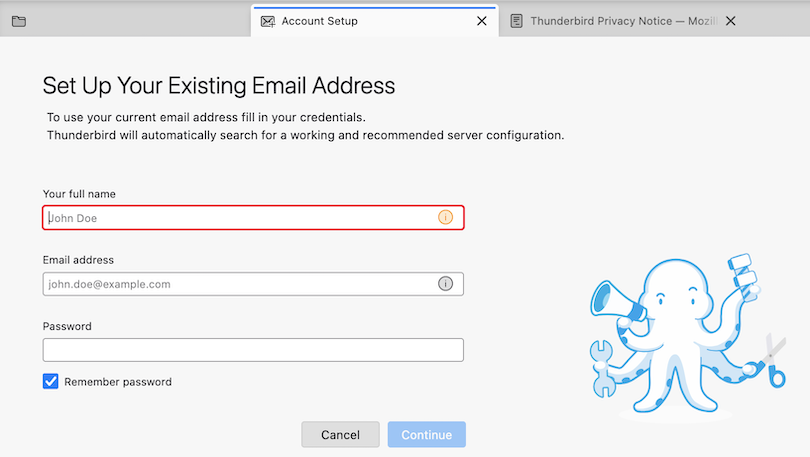
But when Thunderbird out of a sudden - instead of the start page - opens the account-set-up tab and asks to "set up your existing email address " (image) the usual suspect is a corrupt prefs.js file. I've seen (and treated) this issue a few dozen times in French and German TB forums: the prefs.js gets corrupted after PC or Thunderbird crashes as well as following power failure. In this case Thunderbird on restart renames the damaged prefs.js file to prefs.-1.js (or sometimes invalidprefs.js) and creates a new virgin prefs.js file of 6 to 7 kB size which doesn't contain any account settings. For this reason Thunderbird can't display any accounts, folders or messages and opens the main window displaying the account set-up tab.
This problem can easily be solved if there is a recent profile backup. Copy the prefs.js file from the backup and - Thunderbird closed - paste it the actual profile folder. If there is no backup one must re-create all accounts, and in case they are POP accounts, one must then link them with the old "pop.xxx.xx" account folders in the Mail folder in profile foldervia Account Settings > Server Settings > Message Storage Local Directory > click on Browse button
Modified by Mapenzi
Some leaps in version numbers cause a new profile to be created. I believe that a knowledge base article explains why. I cannot look for it right now.
Mapenzi, in the situation that you describe, is a new profile created too?
Rick said
Some leaps in version numbers cause a new profile to be created. I believe that a knowledge base article explains why. I cannot look for it right now.
Would be fine. I've never read this in any KB article.
Rick said
Mapenzi, in the situation that you describe, is a new profile created too?
No, there is no new profile created, that's precisely why I intervene. I'm just looking up those cases of corrupt prefs.js files in the German forum where I diagnosed this issue some years ago .
https://www.thunderbird-mail.de/forum/thread/97730-profil-l%C3%A4sst-sich-nicht-%C3%B6ffnen/ https://www.thunderbird-mail.de/forum/thread/97491-nach-aufruf-ist-heute-mein-thunderbirdprofil-nicht-mehr-vorhanden/?postID=561543 https://www.thunderbird-mail.de/forum/thread/64206-keine-konten-mehr-nach-neuinstallation/ https://www.thunderbird-mail.de/forum/thread/67699-trotzdem-noch-alle-konten-weg-erl/ and many many more between 2013 and 2025
Modified by Mapenzi
Okay. I am now as far as Rick / David’s suggestions.
Under “Profile: default
This is the profile in use and it cannot be deleted.
Default profile. Yes
Root directory. …..\Roaming\Thunderbird\Profiles\3zllclw.default. Open Folder Local directory. …..\Local\Thunderbird\Profiles\3zllclw.default. Open folder. “
At the top it says. “Restart
Restart with Add-ons Disabled Restart normally”,
I should add I haven’t got the usual T’bird front page with the list of folders and messages.
I want them back, please!!
Going back to David’s suggestion of deleting the T’bird folder from Roaming and reinstalling from the backup I put on the memory stick, even though some of the Script Files didn’t copy?
BTW I used POP accounts.
Please ignore the backup/restore steps. Those were just suggestions for AFTER your problem is fixed and you have the new PC. Let's wait for Mapenzi's results. I may have erred in mixing my solutions. Salvaging your existing profile is the goal.
Mapenzi, this is what I had in mind: https://support.mozilla.org/en-US/kb/dedicated-profile-thunderbird-installation
Does not seem relevant to this case.
Thanks for sharing your knowledge.
david said
Let's wait for Mapenzi's results.
Don't wait for more results. The threads in the German forum I cited were just a few examples of corrupted prefs.js files. Of course there are many others I could cite and in which I was implicated as a helper between 2013 and 2025. I only cited a few of those cases to prove that corrupt prefs.js files are rather frequent events.
A proof in BigMart's case would be if he finds a prefs.js with the actual date and 6 to 7 kB size in his profile folder besides a prefs-1.js (or generally speaking a prefs-x.js file) of the same date with a size between about 20 to 40 kB (depends on how many accounts, address books and calendars, etc...) and the actual date .
If the proof is made several solution are possible: • find a prefs.js file in a recent backup and replace the "virgin" prefs.js in the actual profile folder or • rename the "old" prefs-1.js file in prefs.js (works rarely but is a fast solution) or • set up again all POP accounts and then link them with the old, still existing related "pop.xxx.xx" account folders in Mail via Account Settings > Server Settings > Message Storage Local Directory > click on Browse button or • set up again all POP accounts but instead of linking them with the old, still existing related "pop.xxx.xx" accounts rename the account folders in Mail: Let's say there was one GMX account, then you'll find a "pop.gmx.com" in Mail After re-creating this GMX account there will be a new "pop.gmx-1.com" account in Mail. Remove the new "pop.gmx-1.com" account from Mail and rename the old "pop.gmx.com" account in "pop.gmx-1.com", so the old account folder will be linked to the newly created GMX account. Of course all of the latter manipulations must be made when Thunderbird is closed.
BigMart said
How does one translate pages from German to English (on my iPad) ?
This wasn't meant for you but a reading for the co-helpers