


Is there a feature that allows you to pin emails to the top of the page like in Outlook?

I really miss being able to pin messages to the top so I can remember to go back to them. Is that possible with Thunderbird?
Chosen solution
Thank you for the detailed instructions! I will give that a try!
Read this answer in context 👍 0All Replies (4)
No there is no pinning. Perhaps use the tag feature (pressing 1 when the message is selected in the list will tag it important for instance), and then a save search (Ctrl_Shift+R) to create a virtual folder containing your tagged email.
Okay, I will try that. Thank you!
You can use any of the default Tags or create a few very specific ones.
- Settings > General
- scroll down to 'Tags' section
- click on 'New' and follow instructions to create a specific tag.
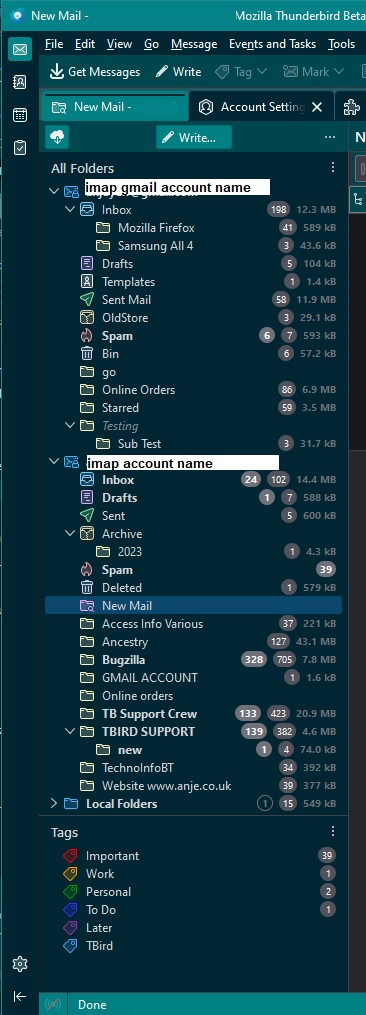
After 'tagging' specific emails: You could enable the 'Tags' option in the Folder Pane. Top of Folder Pane on the right is 3 dots - click on them to see a drop down and select 'Folder Modes' > 'Tags'
'Tags' usually displays at the bottom of Folder Pane but can be moved to top if required as it also has 3 dot menu with a move option. When you select one of those tags that are listed in that section, as an example 'Important' - it will scan everything and locate all emails with that 'important ' tag and display as an auto virtual list on the right. I've added an image below as a guide.
Chosen Solution
Thank you for the detailed instructions! I will give that a try!