

This thread was archived.
Please ask a new question if you need help.

Archived
Taskbar context menu "new instance" button about:config preference?

Hello,
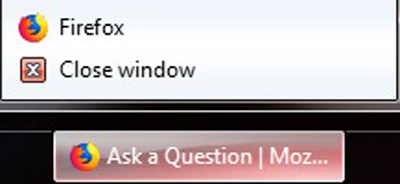
What about:config preference is causing the following new instance "firefox" button to appear in the taskbar right click context menu?
reference:
https://i.postimg.cc/DwQdCy3N/Context.jpg

I have all of the following set to false:
browser.taskbar.lists.enabled
browser.taskbar.lists.frequent.enabled
browser.taskbar.lists.maxListItemCount - 0
browser.taskbar.lists.recent.enabled
browser.taskbar.lists.tasks.enabled
browser.taskbar.previews.enable
Initially the list was completely blank with the exception of "Close window" but I have made several changes and can't figure out what is now causing this....
Thanks in advance.
Hello,
What about:config preference is causing the following new instance "firefox" button to appear in the taskbar right click context menu?
reference:
https://i.postimg.cc/DwQdCy3N/Context.jpg
I have all of the following set to false:
browser.taskbar.lists.enabled
browser.taskbar.lists.frequent.enabled
browser.taskbar.lists.maxListItemCount - 0
browser.taskbar.lists.recent.enabled
browser.taskbar.lists.tasks.enabled
browser.taskbar.previews.enable
Initially the list was completely blank with the exception of "Close window" but I have made several changes and can't figure out what is now causing this....
Thanks in advance.
All Replies (1)
No one knows what is causing this????????