Windows 10 reached EOS (end of support) on October 14, 2025. If you are on Windows 10, see this article.

Search Support

Avoid support scams. We will never ask you to call or text a phone number or share personal information. Please report suspicious activity using the “Report Abuse” option.

Learn More

I do not wish to have updates as these always lead to problems with my PC

  • 1 reply
  • 1 has this problem
  • 19 views
  • Last reply by Glamdring7

I am very comfortable with my Firefox 25 version and see no need to upgrade it. Every time that I have done so previously has caused me unendable problems in that all my favourite sites are no longer accessible and my familiarity with the site I know has disappeared. I am fed up with being hectored to upgrade every time that I switch on my PC to upgrade to some new version. I have very efficient virus protection and do not need any further protection (indeed it has previously been in conflict with my installed system. So why do I need to update and how do I ensure that I am no longer pestered to update my system. Surely I can set my PC up so that I do not get "update requests" every time I go onto the internet.

I am very comfortable with my Firefox 25 version and see no need to upgrade it. Every time that I have done so previously has caused me unendable problems in that all my favourite sites are no longer accessible and my familiarity with the site I know has disappeared. I am fed up with being hectored to upgrade every time that I switch on my PC to upgrade to some new version. I have very efficient virus protection and do not need any further protection (indeed it has previously been in conflict with my installed system. So why do I need to update and how do I ensure that I am no longer pestered to update my system. Surely I can set my PC up so that I do not get "update requests" every time I go onto the internet.

All Replies (1)

Disabling updates is not recommended and it's a good idea to keep them on even in the presence of a good security suite.

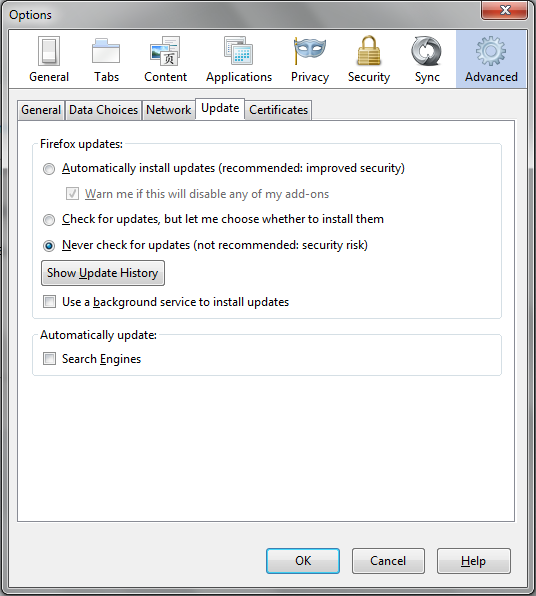
Here's how to disable them. Menu button > Options > Advanced > Update (tab)

Follow the image provided to change your settings.