


Why is Youtube not loading videos correctly seemingly at random?

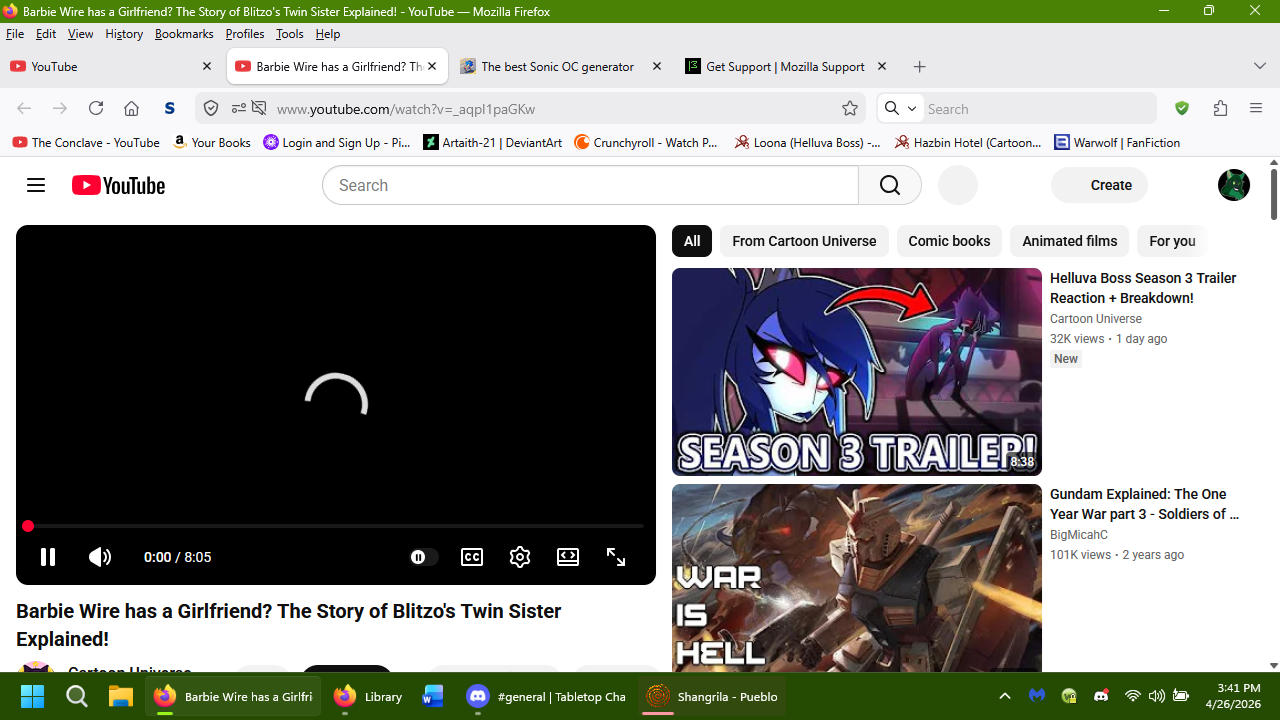
I have noticed that since around Friday, April 24th, 2026, that Youtube videos will sometimes refuse to load properly. The page for the video will come up, but buttons on the page will not load, and nor will the video. This started happening around mid-day, when prior to it, things had been fine. At first I thought it might be tied into the 'ambient mode' option on Youtube itself., But even after shutting that off, I found it was still happening at ranodm.
Is this something new Yotube is doing in their continued (idiotic) fight against ad blockers, or is there an actual glitch in the browser or, more likely, a glitch in Youtube? Like I said, this seems to occur at random and I can't trace the cause for it. I'll include a screenshot of what I'm seeing. But if anyone knows what's happening here, I'd appreciate it.
I should add that I am on Windows 11 and using the new version 150.0 for Firefox. (Congrats on that, by the way.)
I'll be honest, I keep hearing some other browser can block youtube ads innately. (Brave, I think it was called?) and while the idea is cool, I'm not giving up a browser I've used for over 20 years for it. If Firefox can find a way to implement a similar means of blocking Youtube ads innately, I;d love it. But for now, I just wanna know what the devil is happening with the site. Can anyone help?
All Replies (6)
It's most likely Youtube's fight against ad blockers. When opening a video, check the bottom left corner. Sometimes there is a message saying "Experiencing interruptions? Find out why.", which will lead you to a page blaming ad blockers: https://support.google.com/youtube/answer/3037019#check_ad_blockers&zippy=%2Ccheck-your-extensions-including-ad-blockers
You can try to disable your ad blocker to see if it still happens (or use a private window without extensions). Alternatively you can try another ad blocker like uBlock Origin, which is pretty fast in fixing issues most of the time.
Fylvara said
It's most likely Youtube's fight against ad blockers. When opening a video, check the bottom left corner. Sometimes there is a message saying "Experiencing interruptions? Find out why.", which will lead you to a page blaming ad blockers: https://support.google.com/youtube/answer/3037019#check_ad_blockers&zippy=%2Ccheck-your-extensions-including-ad-blockers You can try to disable your ad blocker to see if it still happens (or use a private window without extensions). Alternatively you can try another ad blocker like uBlock Origin, which is pretty fast in fixing issues most of the time.
I have seen that before, but with those instances, the page actually otherwise loads properly. With all icons and even the suggested videos coming up properly. Here, that's not what happens. But it could indeed be them fighting ad blockers again. I wish they'd knock it the hell off. All they did with that is just anger people and prevent any chance of people giving up ad blockers, especially since there is literally no quality control on Youtube for that kind of thing, and nobody wants to risk malicious ads getting airtime on their computers.
Is Mozilla looking into finding a way to prevent ads natively? Like I said, I've heard there's a browser that can do it, so I'm hoping other browsers will follow suit.
I have seen that before, but with those instances, the page actually otherwise loads properly. With all icons and even the suggested videos coming up properly. Here, that's not what happens.
YouTube hides the description and suggested videos, among other things, for some adblock users: YouTube finds a brand new way to bother users of ad blockers
Is Mozilla looking into finding a way to prevent ads natively?
As far as I know, there’s nothing official yet, but there might be something coming: Firefox Has Quietly Integrated Brave's Adblock Engine
Fylvara said
I have seen that before, but with those instances, the page actually otherwise loads properly. With all icons and even the suggested videos coming up properly. Here, that's not what happens.YouTube hides the description and suggested videos, among other things, for some adblock users:
YouTube finds a brand new way to bother users of ad blockers
Yeah, they seem to think annoying people will somehow make them like Youtube more instead of tryign harder to fight back. Pretty sad, really.
Is Mozilla looking into finding a way to prevent ads natively?
As far as I know, there’s nothing official yet, but there might be something coming: Firefox Has Quietly Integrated Brave's Adblock Engine
That last bit is something I hope is legitimate. Will we know if that becomes a legitimate thing, and how will we be able to set it? Will we still need stuff like the various adblocker extensions when/if that goes through, or what?
Hi,
The people who answer questions here, for the most part, are other users volunteering their time (like me), not Mozilla employees or developers. When a Mozilla employee jumps into a discussion, you'll see the Mozilla Staff label next to their name.
If you wish, you can leave feedback for developers on the Mozilla Connect website. Click the Firefox Menu  button in the toolbar, click Help and select Share ideas and feedback…. Alternatively, you can use this link. Your feedback is collected by a team that reads it and gathers data on the most common issues.
You can also file a bug report or feature request. See File a bug report or feature request for Mozilla products for details.
Fylvara said
As far as I know, there’s nothing official yet, but there might be something coming: Firefox Has Quietly Integrated Brave's Adblock Engine
Please note that this is something being considered to be used in tracking protection, NOT in blocking ads natively (see [https://www.reddit.com/r/firefox/comments/1sttf82/comment/oi1xklx/ this official comment). However, there are plenty of advanced ad-blocking extensions for Firefox.
Regarding your initial issue, an ad blocker might be the reason (and you can check that by temporarily disabling it), but you may also want to take a look at other standard troubleshooting steps that may help:
- Please check if you have Enhanced Tracking Protection (ETP) enabled. You can do that by clicking the shield
 icon in the left part of the address bar.
- If ETP is enabled, try disabling it.
- If the problem is not fixed, try clearing Firefox cache.
- If it does not help, try clearing cookies and data for YouTube (warning: you will be logged out on this website).
- If it also does not help, try running Firefox in Troubleshoot Mode (which will, particularly, temporarily disable your add-ons). If the problem doesn't persist, please follow the steps from this article to troubleshoot further.
Modified by Denys