


Why does Firefox no longer allow for a provision to remove the: "This connection is not secure." message?

Hello,
Firefox used to provide a way to remove the: "This connection is not secure." warning message for sites that are using "http". Believe me, I understand the need for security, but when the site is an internal, intranet site behind a firewall, why is there no longer a provision to turn this warning message off? This makes no sense to me. I have no problem with the "Not Secure" indicator up near the URL. That makes sense. Chrome does this, but they don't assume every "http" site is most likely dangerous. Again, I'm talking about "http" sites that are internal, intranet sites that can only be used by people inside their firewall.
Thank you, -Joe Hummer
All Replies (9)
Hi Joe, can you elaborate a bit more? From where you would like to remove the message? Can you upload a screenshot of what you're experiencing?
The message you seem to be referring to is a TLS/encryption error on HTTPS connection, not something shown on just plain HTTP connection if I understand correctly. Can you attach the whole error message, incl. any "advanced" sections expanded, showing detailed error codes and similar to help understand the state?
Gewysig op deur jbr
Or this is related to password autofill as the previous support.mozilla.org/questions/1388116 seems to pertain to?
Bonsoir
Is it yout question
Insecure connection password warning in Firefox https://support.mozilla.org/en-US/kb/insecure-password-warning-firefox
https://support.mozilla.org/en-US/questions/1507742 If you wish to test userChrome.css
And test http://http-password.badssl.com
Thanks for your reply!
Sorry, I guess I was thinking that the "This connection is not secure." message I mentioned was enough. Oops.
I am a web application programmer for a County government IT team. I am talking about using “http” websites that I know are safe because we wrote them and they are not public facing. My issue is not whether or not I can hit the website.
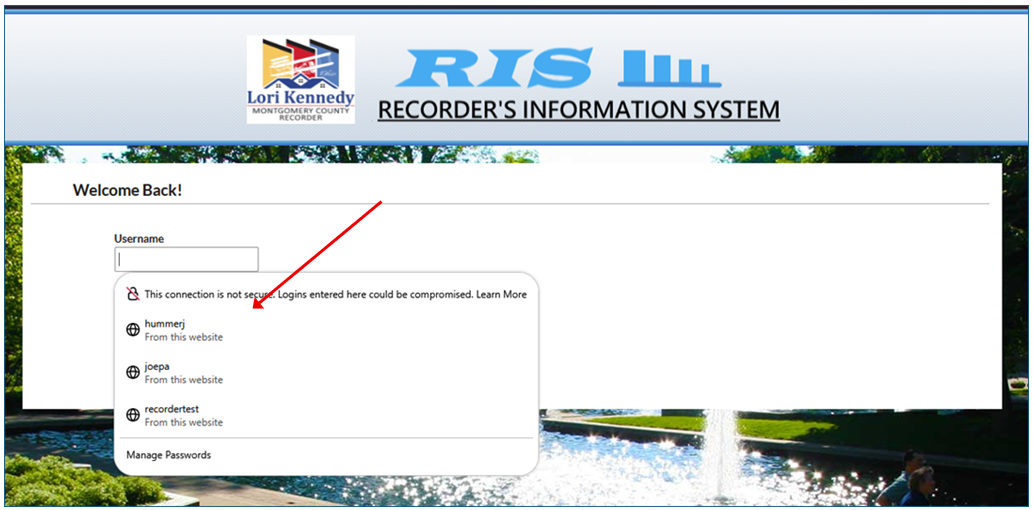
I have uploaded an image showing where the message gets shown.
This message comes into play on username/password fields on web pages. Firefox used to have about:config settings that allowed users to turn off this message. It seems that Firefox now thinks that “http” sites should always give this warning regardless of whether or not they are behind a secure firewall.
I did find something on Google saying to set the following Firefox settings to specific values for this issue. But they do not change anything. security.enterprise_roots.enabled (set to true) security.insecure_field_warning.ignore_local_ip_address (set to true)
If you wish to test userChrome.css https://connect.mozilla.org/t5/ideas/allow-users-to-disable-insecure-passwords-warning/idc-p/46268/highlight/true#M26782
Credentials over HTTP are not safe, no matter how your app is written, as they transmit plaintext, so if Bob wanted to cause trouble to Alice by grabbing their credentials and then doing some action under their name/login, they could; doesn't matter it's all local to e.g. an office or internal network. It's fair users are aware — the warning doesn't get in a way to use the stored credentials, it's just a reasonable warning, mostly for users who can't infer whether they're connecting somewhere just locally or not.
Your screenshot is not showing whether an IP or hostname is being used, see: https://bugzilla.mozilla.org/show_bug.cgi?id=2069704 https://bugzilla.mozilla.org/show_bug.cgi?id=1974715 https://bugzilla.mozilla.org/show_bug.cgi?id=1337246 as to which is considered a secure "local" context and which is not.
jbr, thanks for your reply.
I left out the URL in question on purpose.
You make a good point about credentials. But that's a whole different discussion. I should have made sure my screenshot did not involve stored credentials.
Your reply does not address my actual question. The "This connection is not secure." message is there whether you have stored credentials or not. So, with that in mind, do you still have the same concerns? If so, my question then is, why do you think Chrome and Edge are not forcing this warning message on its users?
The only reason I am using Firefox is because it provides a programming functionality not found in Chrome and Edge.
The ability to listen in to plaintext HTTP form POST data does not change whether the credential is stored in the browser or typed manually.
I'm not the right person to ask about other browsers' strategy to trade end users' privacy or security for what I'd perhaps call "popularity" if you will.
There seems to be some confusion in the bug timelines what "local" means, as some comments hint at "secure context" which would only mean local loopback addresses (and no hostnames, as DNS/name resolution is not used in the inferring of sensitivity of the connection; besides *.localhost namespace), whereas the original pref timeline specifically mentions local/private network ranges (again, only as IP address directly, not a host resolved to the same) — so that sounds like if your service just used plain IP address to connect, the warning would be suppressed by default. If you feel strongly about the security posture of the functionality and not including hostname resolution to the equally private LAN ranges, feel free to interact with the bug(s) linked above; you have the relevant people right there in the timelines.
jbr, thanks for your input.