


Customizing the "From" field in a Thunderbird filter
I use a Thunderbird add-on named "Full Address column" on my Windows 11 system. (TBird version 152.0.1, moving soon to 156) It adds a field with the heading: Sender (@) I would like to filter incoming email based on that field. I see that I can edit a filter to customize a Message Header. Should I use Sender (@) or just Sender Or something else ? The use case is rare enough that I thought I'd ask here before experimenting.
All Replies (3)
To update the query; when I tried Sender (@) I received the error message
> The header you entered contains an invalid character, such as ‘:’, a non-printable character, a non-ascii character, or an eight bit ascii character. Please remove the invalid character and try again.
But that is what the column header says.
Open an email source (ctrl+U) Look there at the message header fields. That is what you can filter, not some spoof of the information in the header which is what the sender@ column is.
Note that from: is rarely an unadorned address likewise a to: mostly they come with a display name set by the sender and the email address. That some folk think removing that displayname somehow improves security escapes me. I have always used the as submitted displayname in the from: and to: columns, removing the rather silly correspondents column entirely. I still do that.
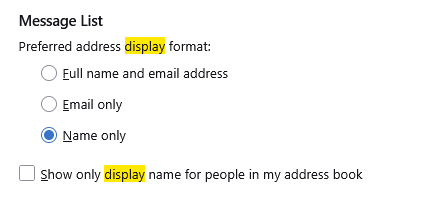
Thunderbird has also had natively had a setting that allows the user to specify what is seen (the display name from the email along with the email address or the pretty name using information from the address book since about version 3. In more recent times the options have been expanded to include the flowing.
I would suggest that there is little value in the addon and the maintainer is likely to abandon it soon as the functionality is included in the application.
If you want to filter in the From: do so, but be aware it is rarely unadorned so you use contains and the email address. Not is and the email address.
Thanks; useful information.