


Messages lack chronological order of reception, though I have indicated that I want received order.

I have not received a reply to my question, and so, I am posting a variation. Suddenly, messages I receive lack chronological order of reception, though I have indicated that I want received order. Old messages and new messages are mixed. What do I need to do so that all received messages are in chronological order, as they always have been?
All Replies (5)

Gekose oplossing
Did you verify the sort order ( Cick on View and then Sort ) . What is your current sort order ?
Thanks for your reply. Where may I find the "sort order"? I have been adjusting messages from an icon up to the right. I may be in the wrong place.
Click on View and then Sort
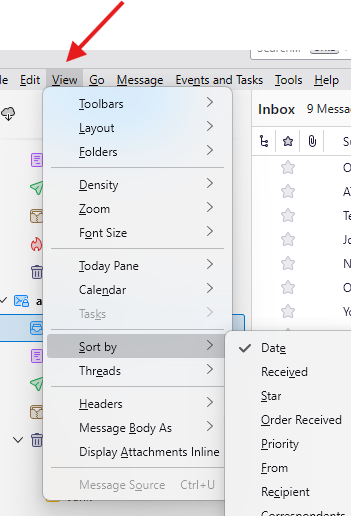

You can also click on column headings. If one click sorts messages in ascending or descending order, and you want the other order, click again on the column heading.
Thank you, very, very much.