


"Forget About This Site" doesn't delete form history

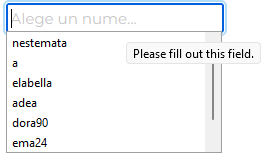
There's a website I used a lot and now I want to delete everything about it. I go to history, I select it then I press "Forget About This Site". I enter the address again to check it. Boom, form history it's still there! This is the expected behaviour? Wouldn't be normal that form history to be cleaned too?
Gewysig op deur user240755580702508971240724461976702397804
All Replies (2)

That could be the form filler built into Firefox. Click in the field, enter a character or two and STOP ! Using the arrow keys, highlight an unwanted entry. Then press Shift + Delete
Repeat as needed.
Only site specific data (except bookmarks) is removed by "Forget About This Site". Saved form history is not site dependent, but uses the name or id of an input field and thus isn't affected by "Forget About This Site".