


Right clicking the star of an already bookmarked site does NOT bring up the option to edit the bookmark to put it into a chosen location as described in Helpl

The option to edit the bookmarks is missing from my current version 29.0.1. Right clicking the star produces a menu but not the one described in Help.
Move to Menu
Remove from Toolbar
Menu Bar
Bookmarks Toolbar
Customize
Gekose oplossing
This question was about clicking the star on the Navigation Toolbar to edit the bookmark. You need the left-click the highlighted star button to edit the bookmark because a right-click opens the toolbar context menu.
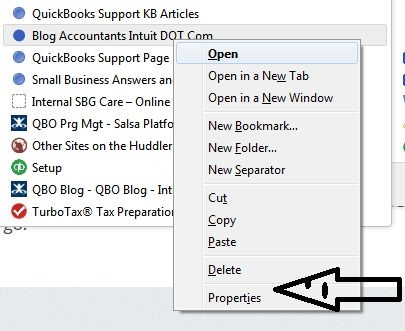
You can right-click a bookmark in other places like on the Bookmarks Toolbar or in the sidebar and in the Bookmarks Manager (Library) to edit the Properties.
Lees dié antwoord in konteks 👍 0All Replies (4)
How about if you click on the Star?
Go to your bookmark and right click the edit function is now embedded in Properties. See attached.
Gekose oplossing
This question was about clicking the star on the Navigation Toolbar to edit the bookmark. You need the left-click the highlighted star button to edit the bookmark because a right-click opens the toolbar context menu.
You can right-click a bookmark in other places like on the Bookmarks Toolbar or in the sidebar and in the Bookmarks Manager (Library) to edit the Properties.