


Tbird is using 11GB of space on my 2019 16GB Macbookpro laptop . How do I cut it down to a minimal size and keep it that way.

Part of my problem has to do with the help aricles that direct me to a format that does not exist on myTbird ap ( 159.0)( on my Macbook pro Tahoe 26.7.1. Another problem is that I am constanly being interrupted by sluggishness occurring in last 3 days, probably from memory demands ot Tbird which is insane, I do not have that many emails and have never seen an email program using memory like this. I need accurate guidance to fix this. Help would be so appreciated.
All Replies (4)
Even with a total size of 11 GB Thunderbird should work fluently on your Mac. The question is where do those 11 GB come from: which are the mailbox (message) files in the profile occupying so much space on the hard disk? How big is your Inbox folder? Do you compact your folders regularly? You may follow Thunderbird CPU consumption in the Activity Monitor.
more options Even with a total size of 11 GB Thunderbird should work fluently on your Mac. 11 GB is insane I mean seriously and it is doing spinners for 3 days now, never before.
Telling me to do something I already tried is not helpful, can I find someone who can actually help. I need step by step that works with my laptop,
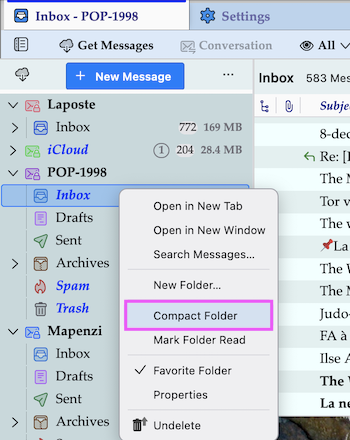
If I should compact folders; how? no email program I have used requires this.
Ok I just purged a lot of emails and it solved the disk space issue. Sorry for being snippy. I am dealing with some weird shit and it is getting to me.
m2trgyzzhm said
If I should compact folders; how? no email program I have used requires this.
R-click on a folder > Compact Folder... For a better understanding why "compacting" folders is so important to avoid very big message (mailbox) files in the Thunderbird profile please read the following SUMO help article: https://support.mozilla.org/en-US/kb/compacting-folders
Okulungisiwe ngu Mapenzi