


Recent changes in how some corporate web sites react to FireFox such as not show the header menues and other function reduction in the last three weeks. YET Chrome and google still function like normal. Is this an attack on Linux supported browsers?
"Recent changes in how some corporate web sites react to FireFox such as not show the header menues and other function reduction in the last three weeks. YET Chrome and google still function like normal. Is this an attack on Linux supported browsers? " I contacted United Health Care (UHC) regarding their menu disappearance and treated it like error on my end until I discussed doing their recommend fixes and the only ones that worked are going to other Google or Micro-Soft supported browsers. FireFox was working fine until three weeks ago. What's up, is it FireFox or UHC?
Isisombululo Esikhethiwe
What add-ons do you have? Try to disable everything or run Firefox in the Troubleshoot Mode to see if the problem goes away. Firefox Troubleshoot Mode is a special diagnostic mode that temporarily turns off add-ons (extensions and themes) and resets some settings. See the Use Troubleshoot Mode in Firefox article for details.
If Firefox is open, you can restart in Firefox Troubleshoot Mode from the Help menu:
- Click the menu button
 , click Help, select Troubleshoot Mode and click Restart in the "Restart Firefox in Troubleshoot Mode?" dialog that opens.
If Firefox is not running, you can start Firefox in Troubleshoot Mode as follows:
- On Linux: Quit Firefox, go to your Terminal and run firefox -safe-mode
(you may need to specify the Firefox installation path e.g. /usr/lib/firefox)
When the Firefox Troubleshoot Mode window appears, select "Open".
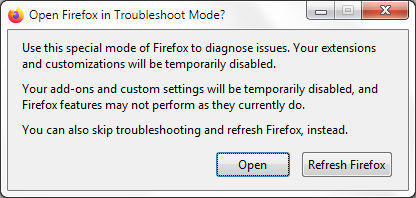
If the issue is not present in Firefox Troubleshoot Mode, your problem is probably caused by an extension, theme or hardware acceleration. Please follow the steps in the Troubleshoot extensions, themes and hardware acceleration issues to solve common Firefox problems article to find the cause.
To exit Firefox Troubleshoot Mode, just close Firefox and wait a few seconds before opening Firefox for normal use again. (If you can't exit Firefox Troubleshoot Mode, please see Firefox is stuck in Troubleshoot Mode).
All Replies (5)
Additional information; Original chat transcript with UHC: "Firefox 1 of 2 about:blank 10:38, Jul 19 Info: Hello! I'm the virtual assistant, here to get you started. How can I help you today? 10:38, Jul 19 You: Tool bar missing from home page, can not properly log out 10:38, Jul 19 UnitedHealthcare Virtual Assistant: We appreciate your patience while we connect you with the first available advocate. Info: You are now connected to Ajinkya. 10:39, Jul 19 You: Tool bar missing from home page, can not properly log out 10:41, Jul 19 You: You are taking too much of yuor customers time 10:41, Jul 19 Ajinkya: Thank you for reaching out to UnitedHealthcare today! My name is Ajinkya. How are you today? 10:42, Jul 19 You: I am wasting too much time for the fix of Tool bar missing from home page, can not properly log out 10:43, Jul 19 Ajinkya: Let’s try a quick fix together: Step-by-step check Please refresh the page (press F5 or reload). Try opening the site in a different browser (Chrome, Edge, or Safari). Clear your browser cache and cookies. Enable pop-ups and make sure extensions (like ad blockers) are turned off. Try using a private/incognito window. If you’re on mobile, please try the UnitedHealthcare app or a desktop browser. If the toolbar is still missing, it may be a technical issue on the site. 10:43, Jul 19 Ajinkya: Fastest help option You can contact our technical support team directly: Member Tech Support: 855‐819‐5909 They can check your account and fix this quickly. 10:45, Jul 19 You: Tried refresh. Will not try other browser since this browser "FireFox" was working fine earlier this month 10:46, Jul 19 Ajinkya: Since you’re using Firefox, let’s try a very quick check specific to that: Simple step to try Press F11 on your keyboard. This turns Full Screen mode on/off. When it’s on, the toolbar can disappear. If that doesn’t bring it back: Second quick step Press Alt on your keyboard once. At the top, click View → Toolbars → Reset Toolbars (or make sure “Menu Bar/Navigation Toolbar” is checked). This often restores the missing toolbar without changing your browser. 10:51, Jul 19 You: The fixes you suggest are for the browser not for the page. I tried it and do NOT get correction to UHC page. Problem appears to be on your end. 10:51, Jul 19 Ajinkya: You’re right to point out that this does sound like a site-side issue, not your Firefox settings. I’m really sorry this has taken so much of your time. To get this resolved as quickly as possible, the best next step is to have our technical team check your account and the website behavior directly. Please contact Member Tech Support: 855‐819‐5909 They can: Check if there’s an active issue affecting your login session 7/19/26, 10:52 AMFirefox 2 of 2 about:blank Fix toolbar/display problems tied to your account Help you safely log out and restore normal access
Add-ons the cause or solution?
Isisombululo Esikhethiwe
What add-ons do you have? Try to disable everything or run Firefox in the Troubleshoot Mode to see if the problem goes away. Firefox Troubleshoot Mode is a special diagnostic mode that temporarily turns off add-ons (extensions and themes) and resets some settings. See the Use Troubleshoot Mode in Firefox article for details.
If Firefox is open, you can restart in Firefox Troubleshoot Mode from the Help menu:
- Click the menu button , click Help, select Troubleshoot Mode and click Restart in the "Restart Firefox in Troubleshoot Mode?" dialog that opens.
If Firefox is not running, you can start Firefox in Troubleshoot Mode as follows:
- On Linux: Quit Firefox, go to your Terminal and run firefox -safe-mode
(you may need to specify the Firefox installation path e.g. /usr/lib/firefox)
When the Firefox Troubleshoot Mode window appears, select "Open".
If the issue is not present in Firefox Troubleshoot Mode, your problem is probably caused by an extension, theme or hardware acceleration. Please follow the steps in the Troubleshoot extensions, themes and hardware acceleration issues to solve common Firefox problems article to find the cause.
To exit Firefox Troubleshoot Mode, just close Firefox and wait a few seconds before opening Firefox for normal use again. (If you can't exit Firefox Troubleshoot Mode, please see Firefox is stuck in Troubleshoot Mode).
Thank you https://support.mozilla.org/en-US/user/TyDraniu/
I ran in trouble shooting mode and the site worked better. Then I cut various extensions and quickly found UBlock origin to be the problem. Thank you.