


vanillacommunity password warning. Has FF been hacked?

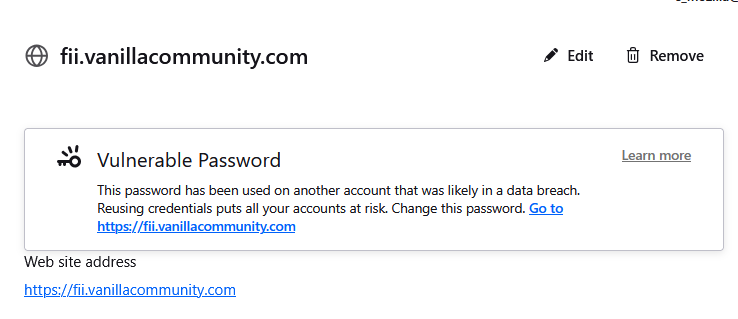
This appeared on my passwords setting page on FF
After a little googling I thought the page was probably safe but in fact it's ServerNotFound
What's going on? Has FF itself been hacked?
All Replies (3)
Your password for another service has been compromised in a data breach, and you are using the same password on Vanilla Community. Reusing passwords across multiple services significantly increases the risk of unauthorized access to your account. For security reasons, you should change your password on Vanilla Community immediately and ensure that you use a unique password that is not used on any other service.
So Vanillaforums and another site (the french post office!) have both been compromised and someone is not only recording that fact but is actually saving all the passwords. And please note I used different email addresses, so how's that working? Is this helping the world?
Anyway, got it now and thanks for the help
Firefox checks the date of a known website breach against the date you saved a password for that website. If the website was breached after you saved your password, you’ll see this alert:
- Vulnerable Password: This password has been used on another account that was likely in a data breach. Reusing credentials puts all your accounts at risk. Change this password. Go to (name of the site).
What the alert means
- A website where you have a saved login experienced a known data breach.
- Your saved password for that site may no longer be secure.
- Firefox helps you act quickly by flagging the login and guiding you to update it.
Firefox will also check to see if you’ve reused any of these potentially vulnerable passwords with other logins you’ve saved to Firefox. The browser does this by creating an encrypted list of your breached passwords, then checking it against all saved passwords. Firefox does not keep logs of your plaintext passwords or know them.
Note: Firefox performs these checks locally and privately. Your passwords are never sent or shared.