


Private browsing

Firefox iOS updated this morning to 143.1 In private browsing it’s in dark mode automatically and won’t change even if changing to light in the settings.
Any help? Steve
All Replies (17)
Hi Steve,
I'm on 143.01 as well, but I couldn't reproduce the issue. Have you tried to restart your app to see if it helps?

I have that problem as well, very frustrating, using Firefox 143.1 on ipados 26.0.1
Okulungisiwe ngu peter18
I have the same issue. Started with 143.1 and is not fixed with 143.2.
Steps to reproduce. Set Firefox to always use light mode (Settings/Appearance) (or automatic if your phone is set to light mode). Ensure that on the same page "Web Site Dark Mode" is switched off.
Open duckduckgo.com in a non-private tab and it shows in light mode (expected).
Open a private tab and go to duckduckgo.com. Expected: duckduckgo in light mode. However, it shows in dark mode.
Restarted the app, cleaned the cookies and private data. On iOS 18.7.1 at the moment.
It seems that on private tabs, Firefox defaults to web site dark mode and does not default to the appearance setting.
peter18 said
I have that problem as well, very frustrating, using Firefox 143.1 on ipados 26.0.1
Issue still present with firefox 144
Same here. Issue still present in 144.
Hi Peter18 & pv,
I still can't reproduce the issue in 144.1. Do you perhaps requested the desktop version which may trigger this bug?
Kiki said
Hi Peter18 & pv, I still can't reproduce the issue in 144.1. Do you perhaps requested the desktop version which may trigger this bug?
This is on ipados 26.01, and does not change whether I request desktop or mobile site. Please see https://github.com/mozilla-mobile/firefox-ios/issues/27741, where this issue is being reported.
I can also reproduce it on firefox ios beta 144.3, with all website data cleared.
See above
Okulungisiwe ngu peter18
Still present in firefox v145 beta with iPadOS 26.1
Kiki said
Hi Peter18 & pv, I still can't reproduce the issue in 144.1. Do you perhaps requested the desktop version which may trigger this bug?
I am not requesting the desktop version. Desktop site is set to off. Not sure if it helps, but after asking for duckduckgo.com, it briefly flashes light and then shows the dark page.
Issue is still present in 144.3. Everything set to light mode. When I press the 3 dots underneath the page, web dark mode is off. Desktop site is off. Page is in dark mode.
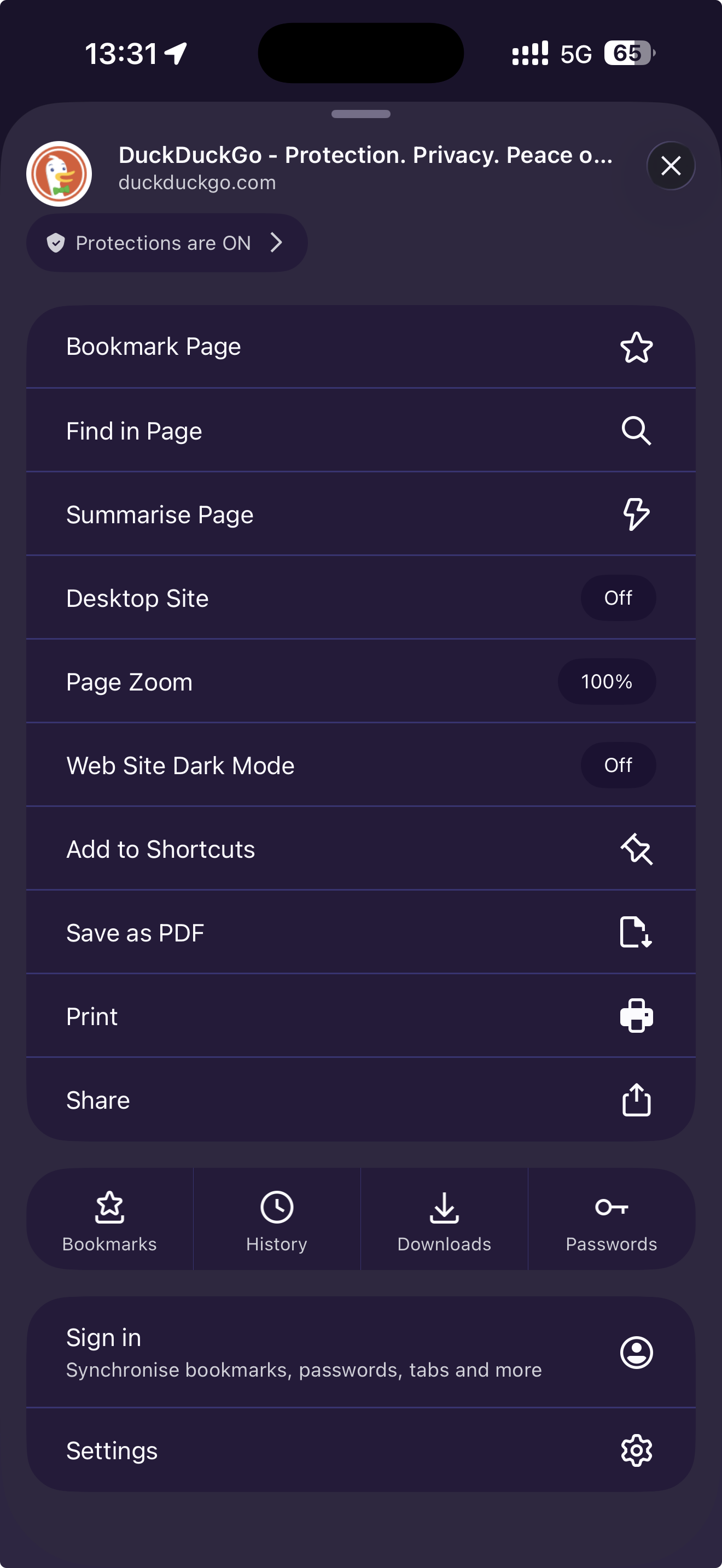
As previously stated, this is still present in iPadOS 26.1 with firefox 145 as well as firefox beta 145.1. No change whether I request desktop or mobile site. Also happens for other sites, namely github.com, spiegel.de, heise.de
Just as a reminder, this is still not resolved in firefox 146 and firefox beta 146.1
Same here. I even deleted Firefox and reinstalled it again fresh. Issue is persistent. Can we get an update on when this will be resolved?
Hey folks,
Apologies for the lack of updates. I'll see if we can get somebody from product to help clarify. Thanks for your patience!
Still not fixed in v147. :/
This was still not fixed in the last release. @kiki, can you give an update on fixing this, it's been 2 months now. I guess this should be very easy to fix.
Hi pv,
you may want to check out https://github.com/mozilla-mobile/firefox-ios/issues/27741 to monitor the progress of the bug.