


Windows 10 reached EOS (end of support) on October 14, 2025. For more information, see this article.

Search Support

Avoid support scams. We will never ask you to call or text a phone number or share personal information. Please report suspicious activity using the “Report Abuse” option.

Learn More

Renaming an extension

  • 3 uphendule
  • 0 zinale nkinga
  • 48 views
  • Igcine ukuphendulwa ngu Paul

more options

I want to change the name of my Firefox extension from "eBird reviewer utilities" to "eBird reviewer assistant". I thought that it would be sufficient simply to change the name in the manifest:

 "name": "eBird reviewer utilities",
 "version": "1.3.46",

to

 "name": "eBird reviewer assistant",
 "version": "1.3.47",

(This was sufficient for Chrome.)

Firefox on my Windows 11 laptop processed this exactly as I expected, picking up the new version and new name. However, Firefox on my Windows 11 desktop does not recognize that there is an update, it only says no updates available. Likewise, Firefox on my Android phone has not picked up the update.

I noticed that the name on the product page was still the old one, so I tried renaming it there, and bumping to version to 1.3.47.1. On the Developer Hub, the extension is correctly listed with the new name and version (see attached screenshot)

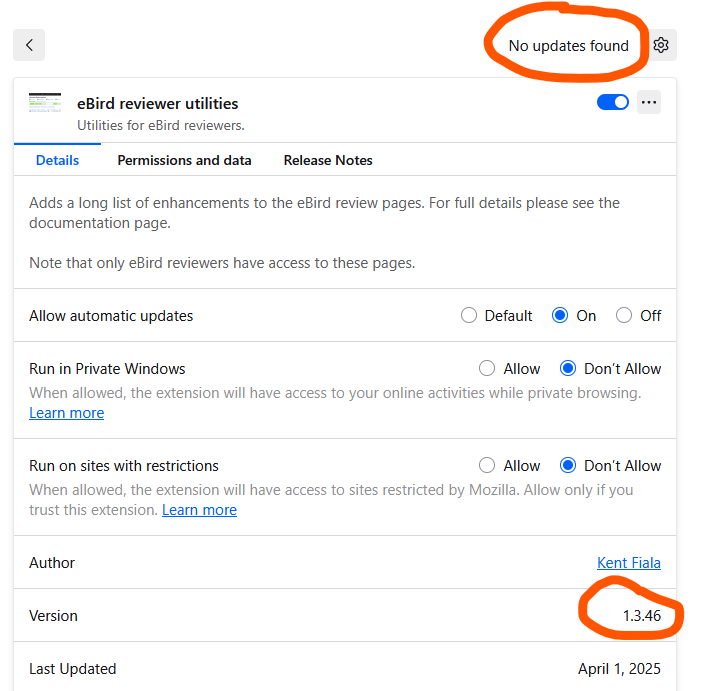
However, my desktop running at 1.3.46 still says "No updates found". (See second attached screenshot)

So my first question is, is the confusion related to the attempted name change? And secondly, regardless of the reason, how do get the update recognized?

I want to change the name of my Firefox extension from "eBird reviewer utilities" to "eBird reviewer assistant". I thought that it would be sufficient simply to change the name in the manifest: "name": "eBird reviewer utilities", "version": "1.3.46", to "name": "eBird reviewer assistant", "version": "1.3.47", (This was sufficient for Chrome.) Firefox on my Windows 11 laptop processed this exactly as I expected, picking up the new version and new name. However, Firefox on my Windows 11 desktop does not recognize that there is an update, it only says no updates available. Likewise, Firefox on my Android phone has not picked up the update. I noticed that the name on the product page was still the old one, so I tried renaming it there, and bumping to version to 1.3.47.1. On the Developer Hub, the extension is correctly listed with the new name and version (see attached screenshot) However, my desktop running at 1.3.46 still says "No updates found". (See second attached screenshot) So my first question is, is the confusion related to the attempted name change? And secondly, regardless of the reason, how do get the update recognized?
Ama-screenshot ananyekiwe

Isisombululo esikhethiwe

Hello,

I am glad to hear that your problem has been resolved. If you haven't already, please select the answer that solves the problem. This will help other users with similar problems find the solution.

Thank you for contacting Mozilla Support.

Funda le mpendulo ngokuhambisana nalesi sihloko 👍 0

All Replies (3)

more options

Hi

I recommend that you raise this on the official add-ons forum at:

https://discourse.mozilla.org/c/add-ons/35

more options
more options

Isisombululo Esikhethiwe

Hello,

I am glad to hear that your problem has been resolved. If you haven't already, please select the answer that solves the problem. This will help other users with similar problems find the solution.

Thank you for contacting Mozilla Support.

Buza umbuzo

You must log in to your account to reply to posts. Please start a new question, if you do not have an account yet.