


Change Menu Item Order of the Bookmarks Context Menu

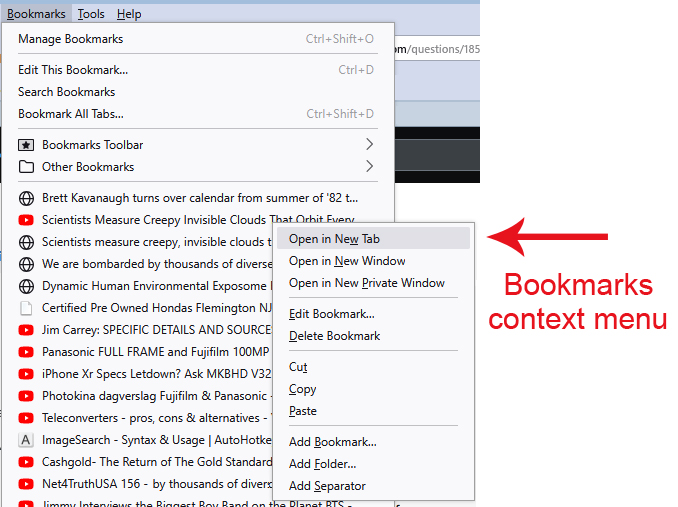
I would like to swap the order of the first 2 items on the Bookmarks Context Menu - that is "Open in New Tab" should be second, and "Open in New Window" should be first.
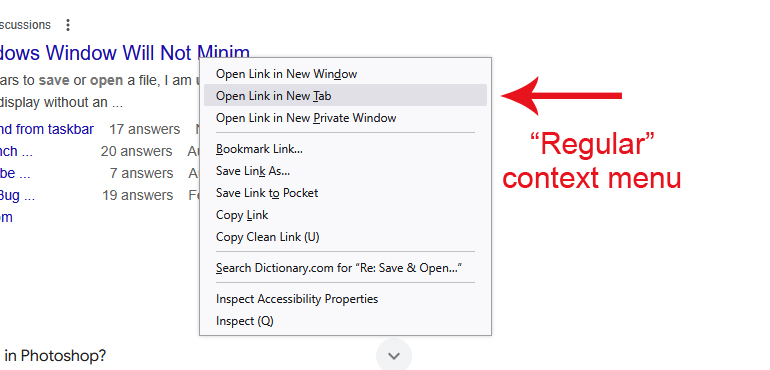
I'm able to do this on the "regular" context menu with the following code...
#context-openlink {
   order: -1;
}
But I cannot find the correct selector for the Bookmarks Context menu (see attached image).
I have tried code (to no avail) such as the following...
#placesContext-openlink {
   order: -1;
}
#BMB_bookmarksPopup-openlink {
   order: -1;
}
Any help is appreciated!
Thanks.
Isisombululo esikhethiwe
Weirdly, the ID has a colon in it:
This is the only way I figured out to write a rule for it, as an attribute:
menuitem[id="placesContext_open:newwindow"] {
  order: -1 !important;
}
Funda le mpendulo ngokuhambisana nalesi sihloko
👍 0
All Replies (4)

That almost sounds like a userChrome.css edit to do what your asking if those are the default browser settings that is the only other way I can see the change being made.
markwarner22 said
That almost sounds like a userChrome.css edit to do what your asking if those are the default browser settings that is the only other way I can see the change being made.
Hi Mark,
Yes it's definitely a userChrome.css edit.
I'm looking for the correct CSS code to edit the menu.
Thanks for the reply :)
Isisombululo Esikhethiwe
Weirdly, the ID has a colon in it:
This is the only way I figured out to write a rule for it, as an attribute:
menuitem[id="placesContext_open:newwindow"] {
  order: -1 !important;
}
Thank you, jscher2000.
That worked like a charm :)