


constant firefox pop ups

How do I get rid of these constant firebox pop ups that block tabs that I have open. it is EXTREMELY affecting my ability to use my laptop. I WANT TO KNOW HOW STOP THIS BS
All Replies (6)

Click Tools in Menu Bar. ... Select Settings. ... Click Privacy & Security located on the left side. Select Block pop-up windows below the Permissions section. ... Exit and relaunch the browser.
Let me if that helped. thanks!
I can't find an option to open tools on the menu bar

Did you read the Firefox help on popups yet?
https://support.mozilla.org/en-US/kb/pop-blocker-settings-exceptions-troubleshooting
Is this a problem with tab preview? When you hover your mouse over a tab up on the tab bar, Firefox shows information in either of two different styles: with a thumbnail image of the tab contents or title and URL only. If you want to turn off thumbnails, there is a checkbox for that on the Settings page.
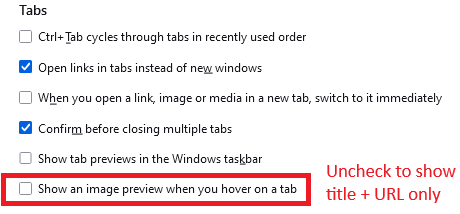
Followed instructions and it does not work as described, can I just be called to RESOLVE, Duane [edited phone# from public community support forum]
Okulungisiwe ngu James
Hi Duane, there isn't any official phone support. Could you explain what the popups look like in more detail? For example:
- Small rectangles in the lower right corner (notifications? see: Web Push notifications in Firefox)
- Separate windows that can be moved around independently (see: Pop-up blocker settings, exceptions and troubleshooting)
- Overlaid text/images inside a tab to subscribe or take other action to use the site
- Something else