

Lolu chungechunge lwabekwa kunqolobane.
Uyacelwa ubuze umbuzo omusha uma udinga usizo.

Okugcinwe kunqolobane
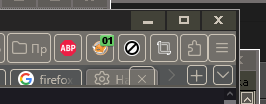
Firefox 130. How do I remove borders around buttons and other controls? (screenshot)
Immediately after updating to version 130, highlighting borders appeared. How to remove them?
Immediately after updating to version 130, highlighting borders appeared. How to remove them?
Okulungisiwe ngu booya
All Replies (2)
This is intentional for high contrast themes due to bug 1881851.
You can remove it with this css:
:root {
 --toolbarbutton-outline: none !important;
}

TyDraniu said
This is intentional for high contrast themes due to bug 1881851. You can remove it with this css: :root { --toolbarbutton-outline: none !important; }
Thank you so much! TyDraniu This has been plaguing me for months! :'( You have my eternal gratitude! <3