


SMTP Failure Sending Email via POP or IMAP

Hi there, I am getting terribly frustrated, desperately appreciate some help!
For over a week now, I can receive emails just fine, but sending fails completely. It has been working for years, but all of a sudden stopped.
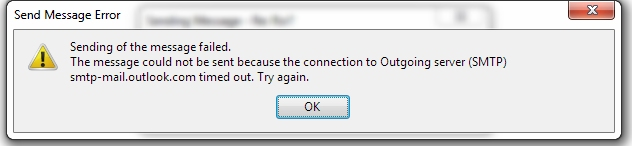
Errors include (see images attached).
Have tried numerous SMTP settings and servers.
Using: Mozilla Thunderbird 52.2.1 (and later version, but rolled back to see if problem got fixed.) Windows7 Pro Avast Antivirus BT Fibre to Home
Any help be greatly appreciated. cheers, Chris
P.S. NOTE: One thing to bear in mind, this did occur at similar time of trying the BETA version on the Outlook Mail Website (But that was on a different PC). Maybe a coincidence, but thought I would mention it anyhow.
Additions: I have tried: • disabling my Antivirus. • rolling back Thunderbird several times to previous versions. • testing port allowance through router.
UPDATE - I have just installed the Outlook App on my android phone, set up my POP account, and IT WORKS both incoming and outgoing! So it looks like it's down to just my PC then.
Isisombululo esikhethiwe
UPDATE :
HOPEFULLY, WE FIXED!!!!
I've downloaded the full "clear" uninstall utility for Avast, and ran it in Safe Mode.
Now back in normal mode, using just Windows Defender & double Firewall, I can 'SEND' and receive messages perfectly!
Fingers crossed, going to test it for little while. Fingers crossed it's not just a fluke!
Funda le mpendulo ngokuhambisana nalesi sihloko 👍 0All Replies (5)
Screenshots of errors.

Many thanks for your reply. Unfortunately this did not fix the problem neither. It still comes up with the "incorrect greeting" message error.
I'm fairly certain now it's purely down to Thunderbird, or Avast, or Windows Firewall.
So am going to try a few more things, disabling one at a time.
Appreciate help provided :-)
Hey there. I don't think so to be honest, but not sure. Doubt it though, as POP/IMAP works lovely off my phone through the Outlook App, without any extra settings.
Funny old thing computers.. LOL
Isisombululo Esikhethiwe
UPDATE :
HOPEFULLY, WE FIXED!!!!
I've downloaded the full "clear" uninstall utility for Avast, and ran it in Safe Mode.
Now back in normal mode, using just Windows Defender & double Firewall, I can 'SEND' and receive messages perfectly!
Fingers crossed, going to test it for little while. Fingers crossed it's not just a fluke!
CONCLUSION :
The good news is all is still running just great! It appears the main fault was Avast Antivirus.
Only uninstalling Avast in 'SAFE MODE' with the "clear" utility from Avast website, finally made emails work again. (I did try uninstalling in normal mode at an earlier date, but it did not solve the problem).
Many thanks for ideas contributed.