Always opens .pdf files in Edge even though Nitro 5 is selected in Add-ons

I have tried everything to make attachments open in Nitro 5 Reader, but Edge always grabs the file and opens it.
This has only happened since a recent Windows (f##%%**) automatic update.
I have since turned off the auto updates.
All Replies (1)
That's Microsoft for you. They don't care what users want, so with their updates, they sometimes change settings to use their programs instead of others. Turning off Windows Updates will just cause more problems in the long run.
These instructions are for Windows 8.1 or lower.
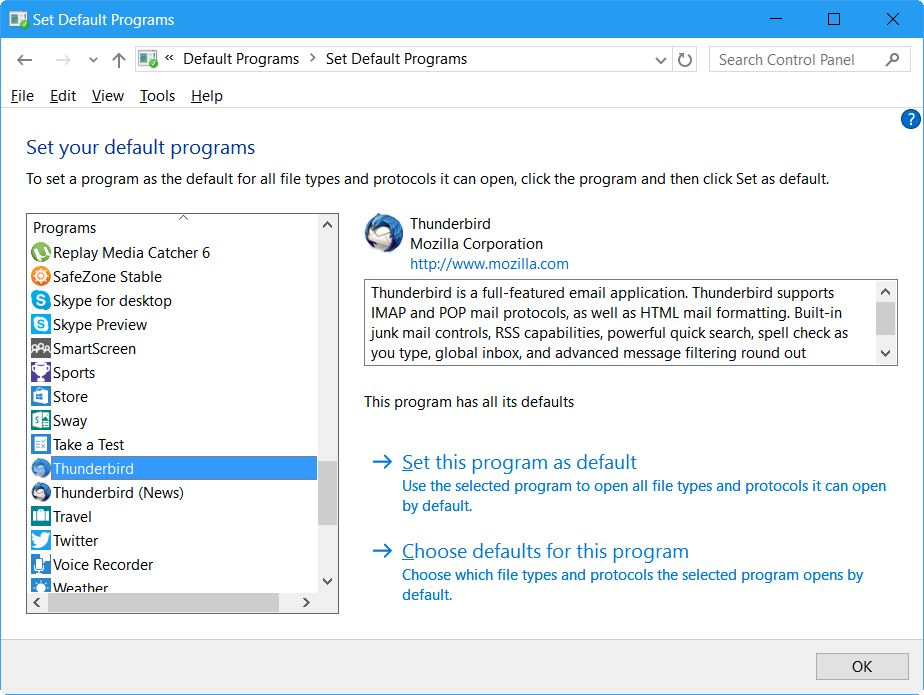
Open up Control Panel, then type "Default" in the search.
Select "Default Programs", then "Set your default programs".
You will see a window like my first screenshot below.
Find your "Nitro 5 Reader" in the left and select it, then click on "Set this program as default".
While your there, do the same for Thunderbird and Firefox (if you are using Firefox).
Reboot Windows.
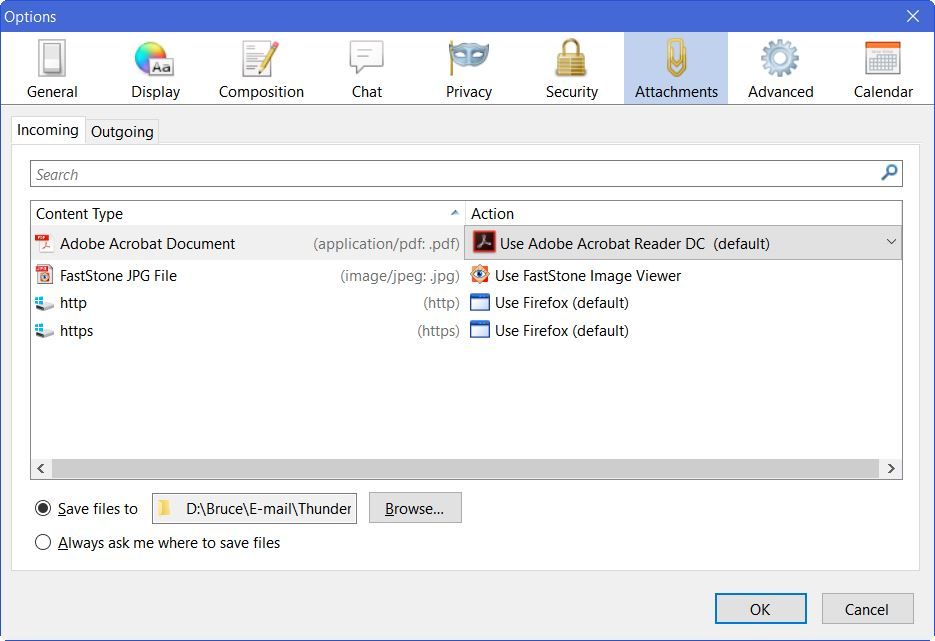
Then in Thunderbird: Thunderbird menu: Tools: Options: Attachments: Incoming tab See my second screenshot below. Make sure that the correct program is set for PDF. If it is not the program you want, then click the program name and choose "Use other", and choose the program you want.