


Links opening in new windows, not in same or new tab

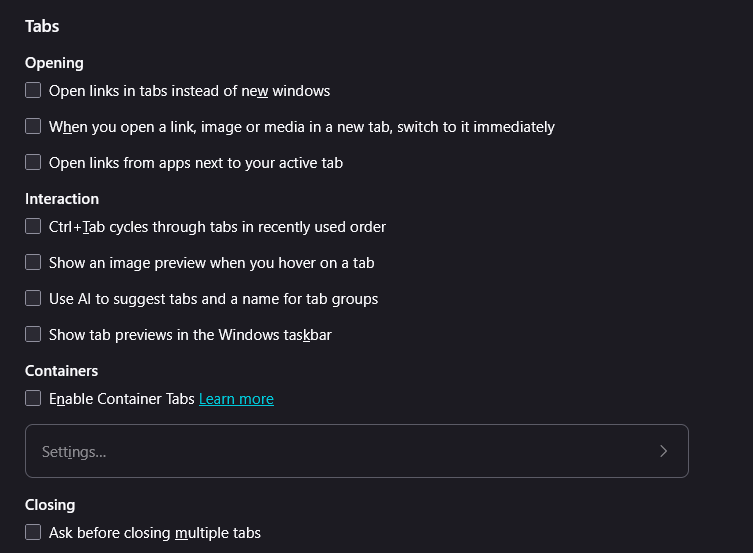
Hyperlinks keep opening in new windows, not in the same/existing window where they were selected. Issue is not unique to Google Search results and occurring across multiple websites. At wits end trying to figure this one out. I have deselected the "Open links in tabs instead of new windows", turned off all extensions, and uninstalled & reinstalled Firefox. Issue is still occurring. Attached is image of my tab selections showing all turned off.
所有回覆 (4)
選擇的解決方法
Well, you need to select Open links in tabs instead of new windows so that it opens links in new tabs instead of new windows. With that unchecked, it will keep opening new windows.
If it's still doing it with that checked, causing new windows to open up, might see if some extension is causing it by to Help -> Troubleshoot Mode which will temporarily disable them all. (To get them back, just restart the browser).
Thank you. I did another clean install of Firefox, unchecked everything, then re-selected only Open links in tabs instead of new windows and it now appears to be working properly.

There must be an easier way?

I've done all of those steps and I still can't get links to open in new tabs. I don't want to have to do a two handed operation just to open in new tab, when it always used to with the settings page selected to open in a new tab, NOT at new window. I keep reading the link and forget my search in in the same tab and I close it because the link wasn't what I wanted. Then I have to go to history and tell it to open that search tab again. Why did it stop working? I used about:config to set several options that other have tried, but it never fixes my problem.....any help?