


Remove search from address bar,

Why isn't there a simple means to remove/prevent searches for the address bar, using config doesn't work.
I've used Firefox for over twenty years, this annoyance will end that and force a move to Brave.
選擇的解決方法
Hi,
Sorry for the inconvenience. The team is working on implementing a modern embedded search UI for the New Tab. For now, unfortunately, you won't be able to change that behavior. The old code has been removed to clean up space for the new one.
所有回覆 (11)

If you mean you want to type on the new tab search bar and not have the typing continue in the address bar, then read https://old.reddit.com/r/firefox/comments/1ec2hru/disable_address_bar_search/lewwfop/
If you mean you don't want the address bar to react while you are typing, then read https://old.reddit.com/r/firefox/comments/i6ze35/how_to_completely_disable_search_in_the_address/g0z74np/
I'm not entirely sure what "Remove search from address bar" means.
Hello
wilf2, you didn't specify your version of Firefox.
Firefox advanced customization and configuration options. https://support.mozilla.org/en-US/kb/firefox-advanced-customization-and-configuration
Firefox is a work in progress and, to allow for continuous innovation, Mozilla cannot guarantee that future updates won’t impact these customizations.
A illustration.
If you're under Firefox 148, if the subject is about the preference, browser.newtabpage.activity-stream.improvesearch.handoffToAwesomebar. Creat the preference, browser.newtabpage.activity-stream.improvesearch.handoffToAwesomebar, is useless.
Since Firefox 148, browser.newtabpage.activity-stream.improvesearch.handoffToAwesomebar has been removed.
For information, https://bugzilla.mozilla.org/show_bug.cgi?id=1999334

I am using version 147 and "browser.newtabpage.activity-stream.improvesearch.handoffToAwesomebar" preference is not working. And apparently I am one of the .3% of Firefox users who are using this function. Even after reading this "https://bugzilla.mozilla.org/show_bug.cgi?id=1999334" write-up, removing a core preference such as this still doesn't make any sense. I have seen nothing new in the browser that compensates one for attempting to browse the internet without a search bar. Moreover why even have a search bar in the UI that doesn't work? That is a real head-scratcher. Tried searching in the address bar and that is beyond clunky. Well it has been a good run these last 20 years or so, but alas it seems that it is time to move on. Please let me know if you bring this core function back.
Thank you.
Hello
Under Firefox 147, currently 147.0.3 browser.newtabpage.activity-stream.improvesearch.handoffToAwesomebar, the preference is available in about:config and works https://support.mozilla.org/en-US/questions/1565347#answer-1799710
選擇的解決方法
Hi,
Sorry for the inconvenience. The team is working on implementing a modern embedded search UI for the New Tab. For now, unfortunately, you won't be able to change that behavior. The old code has been removed to clean up space for the new one.

Do you really mean to tell us we can't type a URL and simply go there? You mean that everything we type will be passed to a search engine? Unacceptable. I've enjoyed Firefox for many years but if you can't support a simple URL I will go elsewhere. I'm on version 150.
Hello
About, browser.newtabpage.activity-stream.improvesearch.handoffToAwesomebar https://support.mozilla.org/en-US/questions/1583718 This config setting has been reinstated in Firefox 148.02
kevinraftery said
Do you really mean to tell us we can't type a URL and simply go there? You mean that everything we type will be passed to a search engine? Unacceptable. I've enjoyed Firefox for many years but if you can't support a simple URL I will go elsewhere. I'm on version 150.
You can disable search engine suggestions in Firefox settings (Search > Show search suggestions).
Also, please note that your reply is off-topic here, so please ask a new question if you need further help/
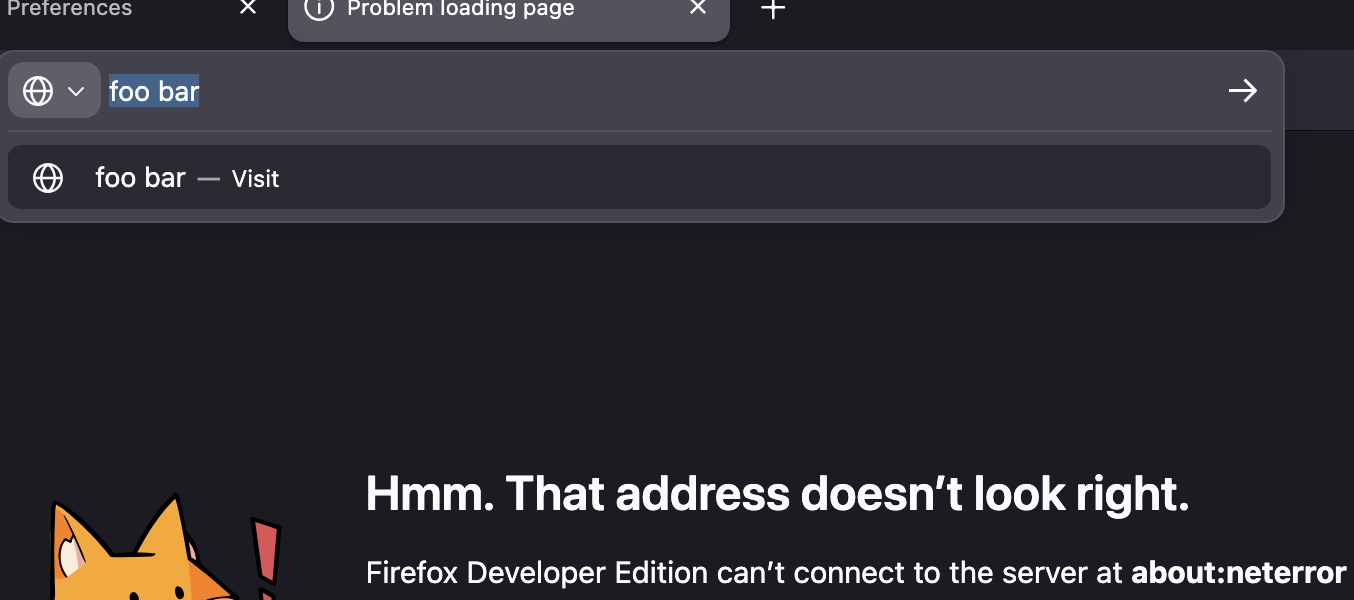
I believe this whole thread was about keyword.enabled preference that still appears to work in current release.
With its default "true" anything that can't fix up to a fqdn is submitted as a query to your default search provider. When I flip it to "false" I immediately get only the "Visit …" affordance and only ever hit that string as a literal URL/hostname, as can be seen in the screenshot:
Denys, I respect what you say but I don't understand why you think I was off-topic. The title of the original post was "Remove search from address bar" and I think the original poster meant that. I meant the same.
kevinraftery said
Denys, I respect what you say but I don't understand why you think I was off-topic. The title of the original post was "Remove search from address bar" and I think the original poster meant that. I meant the same.
The OP was referring to the new tab search bar handing off searches to the address bar, though that may not be obvious from the first look. Sorry, I should have been clearer initially.