


Font Rendering Issue

Hello,
The fonts are not rendering properly on few websites, example(apnetv.xyz), everything was working fine with stable release of v146.
The beta versions were having the same issue, i assumed it was related to Beta releases, so I switched back to stable one. However now firefox has released stable v147, the issue persists. Kindly fix it.
Regards, 4hm3d
所有回覆 (6)
Hello,
I have reported to webcompact (https://webcompat.com/issues/200507)
Previously i had attached image, i took the screenshot using mozilla screenshot tool, the fonts were rendered in properly in the screenshot, strange. I have attached the new screenshot which i took using windows print screen button, it clearly shows the issue.
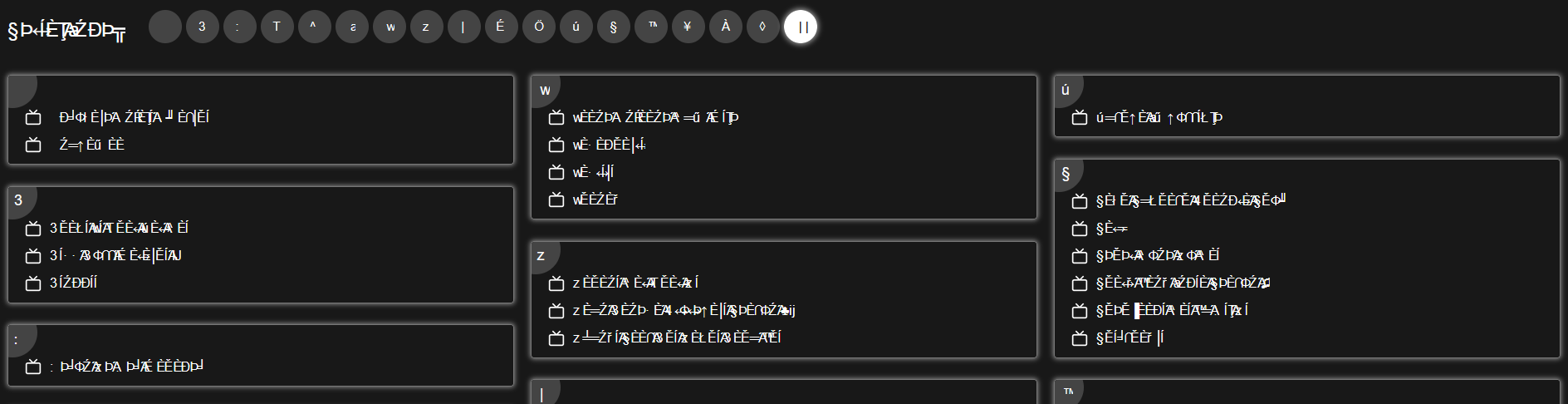
They've updated the Unicode library in v. 147, perhaps it's connected somehow.
Hi again,
A tester has posted a reply, which you can view under the same link. Basically, it says that they were not able to reproduce the issue, and gives some pieces of advice. Could you please try those and post an update here?
For reference, here are the troubleshooting steps we usually give:
- Please check if you have Enhanced Tracking Protection (ETP) enabled. You can do that by clicking the shield
 icon at the left of the address bar.
- If ETP is enabled, try disabling it.
- If the problem is not fixed, try clearing Firefox cache.
- If it does not help, also try clearing cookies and data for the website you experience troubles with (warning: you will be logged out on this website).
- If it also does not help, try running Firefox in Troubleshoot Mode. If the problem doesn't persist, please follow the steps from this article to troubleshoot further.
- Finally, if nothing of the above helps, try creating a new Firefox profile and see if the problem persists. (In case you use the legacy Profile Manager, about:profiles, remember to set your current profile as default again after creating a new one.)
Hello,
Please find the details below for your reference.
1- Disabling Enhanced Tracking Protection: didn't fix 2- Clearing Cache, Cookies, Data: didn't fix 3- I have disabled all the extensions: didn't fix 4- Troublehsoot Mode: didn't fix
I am only able to get the fonts rendered properly, with Incognito/Private window, and all the extensions/addons were enabled as well. The issue is not with extensions or ETP or cache/cookies/data; The issue is with the core Firefox, as i mentioned earlier that it was working fine with stable releases until v146, any beta releases after that had the same issue, and then the issue was passed on to stable release v147.
Regards, Ahmed
I'm afraid I've also been experiencing this issue and failed to find any solutions as per the above, that have fixed or resolved the issue. I asked a friend to it on their computer on their account, and they also began experiencing the same rendering issues their side, too. This suggests it is not isolated to accounts or local machine problems, but there is something fundamentally wrong with the rendering, somehow.
I'm currently experiencing the problem on 147.0.1 using a Windows 11 machine, but I've also seen this on my Linux device, too. I have noticed the problem is predominantly present when I attach an external monitor, but it is consistent across several different laptops and monitors, all running different OS', using different cables and different monitors (suggesting, it's not the hardware or the OS). I have tried this through a USB-C dock and direct HDMI connection, with the same result.
As I am typing this, the browser keep dropping in and out of the rendering being smooth and distorted, and as I moved my cursor around the screen the fonts/text boxes distort and move as the cursor passes over them. I have tried visiting the same sites and completing the same tasks in a couple of other browsers, and not encountered the same issue, unfortunately. However, it would be amazing if this could be resolved.