


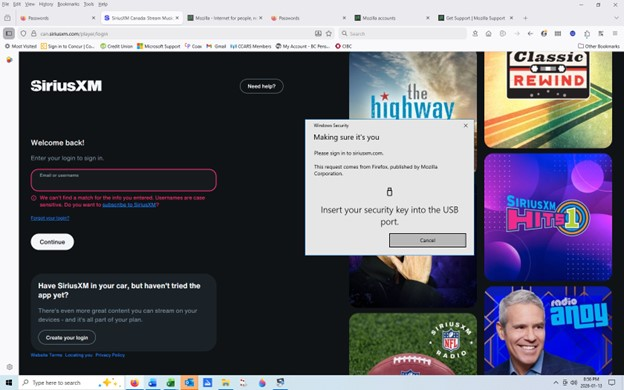
Security Key that appears to be a flash drive

I was trying to sign in to siriusxm.com. A box came up that said "Please insert your security key", with a diagram that looks like a flash drive. It said the request came from FireFox Mozilla Corp.
Is this one flashdrive key that will work for everything Firefox Mozilla Corp wants to guard, or it is something required by SiriusXM? I've never heard of it, but have seen it pop up for two or three things in the last week. I don't know how to satisfy the requirement. I looked though the topics on FireFox help page, and nothing mentions it that I can find.
所有回覆 (1)
Hi,
I believe the request comes from SiriusXM (and is just sent via Firefox). A security key is one of the methods to prove your identity (along with a password). That kind of requests are processed by Windows.
In Firefox, you can protect your saved passwords in a similar way (see Secure Firefox passwords with device sign-in). However, in your case the request comes directly from a website, which suggests that it's specific to this website. It's not about any kind of general key, it should be something you have set for that particular website. In case you haven't, try to look for another login option.